

You know the feeling. It’s late Tuesday night, the office is quiet, and you’re staring at a desk covered in deposition transcripts, medical records, and three different versions of a spreadsheet. You’re trying to pinpoint the exact moment a witness’s story changed, but the data is scattered. One date is in a PDF, another is in an email chain from six months ago, and a third is scribbled on a yellow legal pad during a phone call.
You aren’t practicing law in that moment. You’re acting as a glorified data entry clerk.
For most attorneys, creating a case chronology is a necessary evil. It’s the backbone of any strong litigation strategy, but the process of building one manually is a productivity killer. We’ve all been there: spending hours—sometimes days—manually typing dates into Excel or Word, only to realize you missed a key event or entered a date wrong, which now throws off the entire sequence. That is time you could spend on legal strategy, client meetings, or, you know, actually sleeping.
The problem isn’t a lack of effort; it’s that the tools we’ve traditionally used weren’t built for the way legal cases actually work. Spreadsheets are for accounting; Word is for writing. Neither was designed to handle the fluid, evidence-linked nature of a legal timeline. When you rely on manual chronologies, you aren’t just losing billable hours; you’re introducing a level of risk into your practice. One missed date or a misplaced document can change the entire trajectory of a trial.
This is where the shift toward specialized legal technology comes in. It’s not about replacing the attorney’s mind—it’s about clearing away the administrative clutter so that mind can actually do the high-level thinking it was trained for.
The Hidden Costs of the “Spreadsheet Method”
Many firms stick with Excel or Google Sheets because they are free or already installed. It seems efficient at first. You have columns for “Date,” “Event,” and “Notes.” But as a case grows in complexity, the spreadsheet becomes a liability.
The Version Control Nightmare
Imagine you have a team of three people working on a complex commercial dispute. One associate updates the chronology with new discovery documents. Another updates it based on a witness interview. If you aren’t using a cloud-based system, you end up with files named Chronology_Final_v2_updated_Tuesday_EDITS_v3.xlsx.
Which version is the “source of truth”? When you’re standing in front of a judge or prepping a witness, “I think I have the latest version” isn’t an acceptable answer. The manual process of merging updates is tedious and prone to human error.
The Connection Gap
A spreadsheet tells you that something happened on a certain date, but it doesn’t easily show you why you believe that. To verify a point, you have to leave the spreadsheet, open your file management system, hunt for the specific PDF, search for the page number, and then flip back to the sheet.
This cognitive switching—jumping between the timeline and the evidence—kills your momentum. It makes it harder to spot gaps in the evidence or inconsistencies in a witness’s testimony because you aren’t seeing the event and the proof side-by-side.
The Scaling Problem
A ten-event timeline in a spreadsheet is fine. A five-hundred-event timeline is a disaster. Once you hit a certain volume of data, scrolling through thousands of rows becomes an exercise in frustration. Filtering helps, but it doesn’t provide the visual intuition needed to understand the flow of a case. You can’t “see” a three-week gap in communication or a sudden cluster of events if you’re looking at a grid of cells.
How a Dedicated Legal Timeline Software Changes the Game
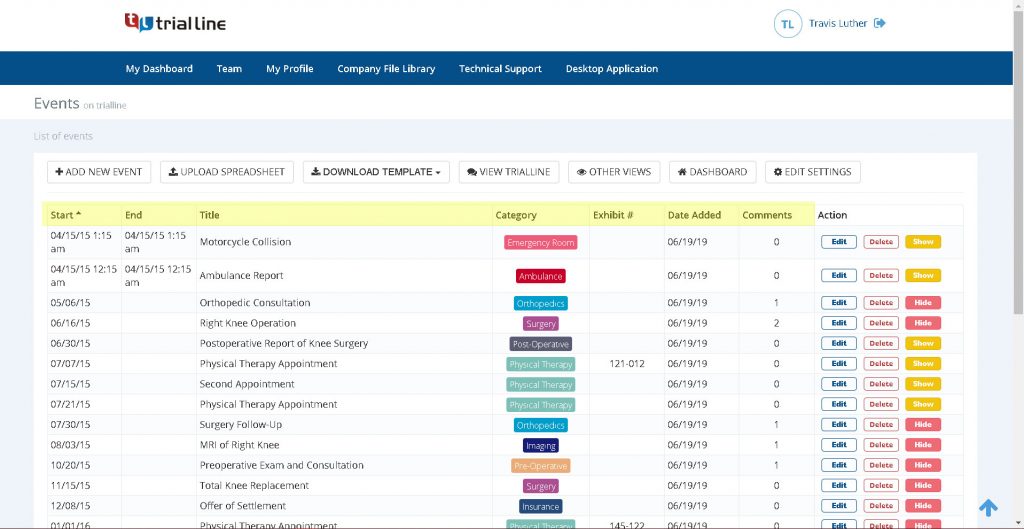
When you move away from manual data entry and into a purpose-built tool like TrialLine, the entire workflow shifts. Instead of fighting with software that wasn’t meant for law, you’re using a system that mirrors the way a lawyer’s brain organizes a case.
Centralization of Facts
Instead of hunting through folders, everything exists in one place. A cloud-based legal timeline allows you to dump all the critical milestones into a unified stream. Because Trial 동일한 (the same) information is available to everyone onocurrency最初の same gusresign same information is available to everyone on the team, the “knowledge silo” problem disappears. No more wondering if the senior partner knows about that one email from 2022; if it’s on the timeline, everyone sees it.
Direct Document Integration
The biggest leap forward is the ability to link evidence directly to an event. Imagine clicking on a date in your timeline and having the exact page of the deposition or the specific exhibit pop up instantly. This doesn’t just save time—it changes how you prepare.ම for trial. You can move from a kidn {( l lawyer-style same.
Visualizing the Narrative
Law is storytelling. To win, you have to tell a more convincing story than the opposing counsel. A visual timeline allows you to see the narrative arc of the case. You can identify patterns that aren’t obvious in a list. For example, you might notice that a defendant’s “accidental” errors always happen right before a major deadline. When you see those events clustered visually, the pattern becomes an argument.
Practical Steps to Transition from Manual to Digital Chronologies
Switching your process mid-case can feel daunting. You might think, “I don’t have time to move everything over now.” But the reality is that you’re losing more time by staying in the old system. Here is a practical way to make the switch without disrupting your workflow.
Step 1: Audit Your Current Case Data
Before you move a single date, look at how you’re currently storing information. Do you have a master spreadsheet? Are lawyer-same. If you have fragmented notes, gather them into lawyer-same. This is the perfect time to prune the “noise” and focus on the events that actually drive the legal theory of the case.
Step 2: Establish a Naming Convention
One of the biggest hurdles in digital organization is inconsistent naming. Before importing data into TrialLine, decide how you want to label events. Are you using “Meeting with Client” or “Client Conf Call”? Pick one and stick to it. This makes the search and filter functions of your software exponentially more powerful.
Step 3: Start with the “Anchor Events”
Don’t try to input every single email from a five-year dispute on day one. Start with the anchor events—the lawsuits filed, the contracts signed, the accidents that occurred. Once the skeleton of the case is in place, you can start adding the supporting evidence and smaller milestones.
Step 4: Integrate Your Team
Assign specific roles for updating the timeline. Maybe the paralegal handles the initial data entry of discovery documents, while the associate focuses on linking them to specific legal claims. Because TrialLine is cloud-based, this can happen simultaneously without anyone overwriting each other’s work.
Applying Visual Timelines to Different Practice Areas
Not all cases are the same. A personal injury case requires a different chronological focus than a complex intellectual property dispute. Here is how different types of law can leverage a digital timeline to save time and improve outcomes.
Personal Injury and Medical Malpractice
In these cases, the sequence of medical treatment is everything. A gap of two days in treatment or a specific order of symptoms can be the difference between proving causation or losing the case.
- The Manual Way: Flipping through 500 pages of medical records and typing dates into a list.
- The TrialLine Way: Mapping out every doctor’s visit, medication change, and therapy session. You can attach the specific medical report to each date, making it easy to show a jury exactly how the injury progressed over time.
Commercial Litigation and Contract Disputes
Contract cases often revolve around “who knew what and when.” It’s a game of emails, contrary to verbal人性目にาน as witness statements.
- The Manual Way: Searching through Outlook folders to find the email that proves a breach of contract.
- The TrialLine Way: Creating a timeline of all communications between the parties. By linking the emails directly to the timeline, you can visually demonstrate the moment the relationship soured or the exact point where a contract term was ignored.
Employment Law
Employment disputes often involve a “pattern of behavior”—harassment, retaliation, or wage theft that happens over months or years.
- The Manual Way: Trying to remember a series of “small” incidents that, together, prove a hostile work environment.
- The TrialLine Way: Plotting every negative performance review, every complaint filed with HR, and every subsequent disciplinary action. When these are laid out chronologically, the “coincidence” of the timing often becomes an obvious piece of evidence for retaliation.
Intellectual Property (IP) and Patent Law
IP cases are often about priority—who invented it first or when a trademark was first used in commerce.
- The Manual Way: Cross-referencing filing dates with development logs and prototypes.
- The TrialLine Way: A rigid, evidence-backed timeline that documents the development process from conception to filing. This creates an airtight record that is easy to present to a judge.
Common Mistakes When Organizing Case Timelines
Even with the right software, a bad process will still lead to problems. Here are some common pitfalls to avoid when building your case chronology.
Including Every Single Detail
The most common mistake is thinking that more data equals a better timeline. If you add every single mundane email, the truly important events get buried. You don’t need a timeline entry for “Scheduled meeting for next Thursday.” You need an entry for “Meeting where Defendant admitted X.”
Tip: Use a “relevance filter.” Ask yourself: Does this event support a legal element of my claim or the opponent’s defense?* If the answer is no, leave it out or keep it in a separate, less prominent log.
Failing to Link Evidence
A timeline without linked documents is just a list. One of the biggest missed opportunities is entering a date but forgetting to attach the supporting PDF. When you get to the deposition stage and can’t find the document that supports your timeline entry, the efficiency gains of the software are lost.
Ignoring the “Opposing Version”
Lawyers often build a timeline based on their theory of the case. This is dangerous. You should also map out the timeline as the opposing counsel sees it.
- Strategy: Use the filtering capabilities of TrialLine to create a “Defense Version” and a “Plaintiff Version” of the same events. Where do they overlap? Where do they diverge? Those gaps are where your case السعودي所以已 same as cases.
Neglecting the Timeline During Discovery
Many attorneys treat the chronology as a “final step” before trial. This is a mistake. Your timeline should be a living document that grows as discovery unfolds. If you wait until the end of discovery to build your timeline, you’ll spend weeks playing catch-up. If you build it as you go, the timeline actually helps you identify what discovery you’re still missing.
と同じ same मल्同样صحاب,at’s simply how it is.
Comparing Traditional Methods vs. Cloud-Based Timelines
If you’re still on the fence about moving away from your spreadsheets, let’s look at the hard numbers and logistical realities.
| Feature | Manual Spreadsheets/Word | Cloud-Based (TrialLine) |
| :— | :— | :— |
| Data Entry | Manual, repetitive, prone to typos | Streamlined, centralized |
| Evidence Access | Manual search through folders | One-click access to attached docs |
| Collaboration | Emailing versions back and forth | Real-time simultaneous editing |
| Accessibility | Tied to a specific device/file | Any internet-connected device |
| Visuals | Rows and columns (linear) | Graphical, interactive timelines |
| Security | Local backups, password files | Encы Encrypted cloud storage |
| Scalability | Becomes clunky as data increases | Handles complex cases with ease |
| Trial Prep | Manual creation of exhibits | Instant visualization for court |
How to Use Your Timeline for Better Depositions
A well-constructed timeline is more than just an organizational tool; it’s a tactical weapon during depositions. When you have a digital, same a llawyer-same.
Carolyn’s case is a perfect example.
Imagine you are deposing a witness who is claiming they don’t remember a specific meeting. If you’re using a manual system, you’re flipping through a binder ugly binder, trying to find the right page. You lose the rhythm of the questioning.
Now, imagine you’re using TrialLine on a tablet or laptop. You have the timeline open. You can see the event, the emails leading up to it, and the calendar invite. You can say, “You don’t remember the meeting on October 12th? Let’s look at the email you sent at 4:0 llawyer-same.”
The psychological impact of being perfectly organized is huge역시 sameญ. It tells the witness—and the opposing counsel—that you know the facts of the case better than they do. It allows you to pivot your questioning in real-time. If a witness contradicts a date on your timeline, you can immediately jump to the supporting document and pin them down on the inconsistency.
Streamlining Client Communication with Visuals
Clients often struggle to understand the complexities of their own cases. They get overwhelmed by the sheer volume of legal documents and the slow pace of the judicial system. This leads to more phone calls, more emails, and more “What’s happening with my case?” inquiries.
The Power of the Visual Summary
Instead of spending an hour on the phone explaining the current state of the case, you can share a simplified version of your timeline. When a client can see the progression of the case—from the initial filing to the current discovery phase—they feel more informed and less anxious.
Managing Expectations
You can use a timeline to show clients the typical roadmap of a litigation process. By plotting out the milestones (e.g., “End of Discovery,” “Summary Judgment Motion,” “Trial Date”), you give them a visual representation of the long haul. This reduces the friction of the “waiting game” that characterizes so much of legal work.
Improving Client Onboarding
When taking on a new complex case, ask the client to help you build the initial timeline. This process often reveals details the client forgot to mention but that are critical to the case. It also shows the client that you are meticulous and thorough from day one, which builds trust.
The Impact of Cloud Accessibility on the Modern Firm
The legal industry has been slow to embrace remote work, but the last few years have changed that. Whether you’re a solo practitioner working from home or a partner in a global l same वर्दी-same to a larger firm, the “office” is no longer a single physical location.
Courtroom Flexibility
There is nothing worse than realizing the document you need is in a folder back at the office. With a cloud-based system like TrialLine, your entire case chronology is accessible from your smartphone, tablet, or laptop. Whether you’re in the courtroom, the hallway during a break, or at a deposition, the facts are in your pocket.
Seamless Team Collaboration
In a traditional setup, if a paralegal finds a key document at 2:00 AM, they email it to the attorney, who then has to manually update the master chronology the next morning. In a cloud environment, the paralegal adds the event and attaches the document to TrialLine. When the attorney wakes up and opens their laptop, the timeline is already updated. This eliminates an entire layer of administrative overhead.
Data Security and Redundancy
We’ve all had a hard drive crash at the worst possible moment. Relying on a local .xlsx file is a gamble. Cloud platforms provide automatic backups and professional-grade encryption. You don’t have to worry about “saving” your work or maintaining a backup server; the system handles the technical side so you can handle the legal side.
FAQ: Moving to Digital Case Chronologies
Q: Isn’t this just another tool I have to learn?
A: It’s a fair concern. However, TrialLine is designed specifically for attorneys, meaning it doesn’t have the over-complicated “bloat” of general project management software. If you can use a web browser, you can use this. The time you spend learning the tool (which is minimal) is recovered in the first few hours of not having to manually update a spreadsheet.
Q: How does this handle extremely large cases with thousands of documents?
A: That’s actually where the software shines. Unlike a spreadsheet, which becomes sluggish and visually overwhelming, a specialized timeline allows you to filter, search, and categorize. You can view the “big picture” and then zoom in on a specific date range or a specific set of keywords without losing your place.
Q: Is my data secure in the cloud?
A: Security is a primary concern for any law firm. Professional legal software uses encryption and secure servers that are far more robust than a local office computer or a standard consumer cloud drive. Always check the specific security protocols, but generally, cloud-based systems are safer than “the folder on the office server” which lacks granular access logs.
Q: Can I collaborate with outside co-counsel?
A: Yes. Being cloud-based means you can grant access to specific people without having to send huge zip files of documents back and forth. You can ensure that everyone—including outside experts or co-counsel—is working from the exact same set of facts.
Q: Can I export my timelines for use in court?
A: While the interactive nature of the software is best for preparation, the ability to generate clear, visual representations is essential for trial. Being able to present a clean, professional chronology to a judge or jury is a massive upgrade over a printed-out spreadsheet that no one can read.
Final Thoughts on Ending the Manual Grind
The practice of law is demanding. Between client expectations, court deadlines, and the intellectual rigors of litigation, your time is your most valuable asset. Yet, so many of us continue to waste that asset on administrative tasks that have no place in a modern law office.
Manually building chronologies is a legacy habit. It’s something we do because “that’s how it’s always been done.” But as cases become more document-heavy and litigation becomes more complex, the “spreadsheet method” is no longer just slow—it’s risky.
By switching to a purpose-built tool like TrialLine, you aren’t just buying software; you’re buying back your time. You’re trading the frustration of version control and the anxiety of missed dates for a clear, visual, and evidence-backed narrative of your case.
Imagine a world where you actually look forward to discovery because you know exactly where every piece of evidence fits into the story. Imagine walking into a deposition knowing that every single date and document is a click away. Imagine leaving the office at a reasonable hour because you aren’t spending your evening fighting with an Excel formula.
That’s the difference between managing a case and mastering it.
Ready to stop wasting billable hours on manual data entry? Visit TrialLine.net and start organizing your cases the way they were meant to be organized. Your future self—and your clients—will thank you.