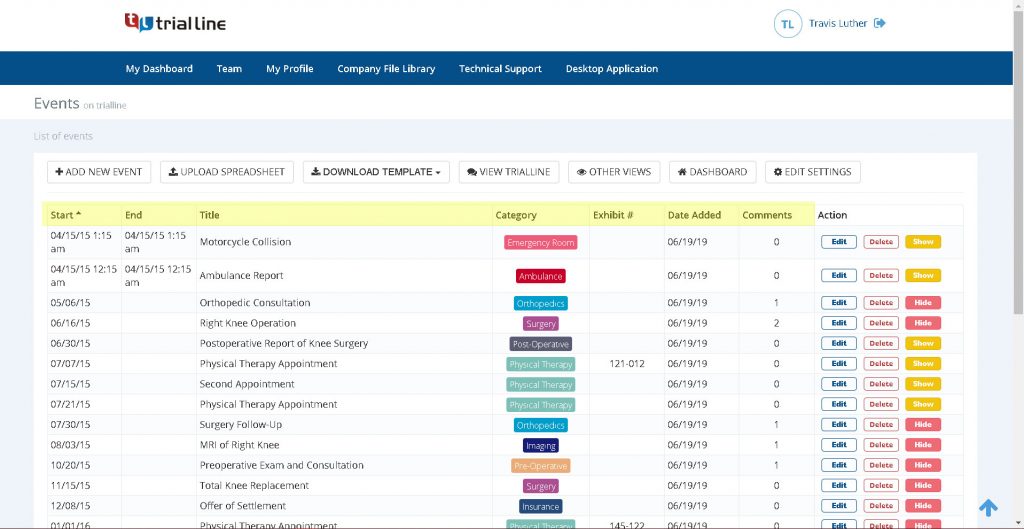

You know that feeling in the pit of your stomach when you’re reviewing a case file at 2:00 AM and you realize a document was filed three days after a deadline you thought you had handled? Or maybe it’s the moment during a deposition when the opposing counsel brings up a sequence of events that doesn’t align with your notes, and you have to scramble through a stack of folders or a cluttered digital directory to find the one email that proves them wrong.
It happens to the best of us. Legal work isn’t just about knowing the law; it’s about managing a mountain of facts. When you’re dealing with complex litigation—whether it’s a messy employment dispute, a high-stakes commercial battle, or a personal injury case with a long medical history—the sheer volume of dates, times, and events can become overwhelming. Most of us rely on spreadsheets, calendars, and perhaps a few handwritten notes. But the problem with a spreadsheet is that it’s flat. It doesn’t show you the gap between two events. It doesn’t visually highlight the contradiction in a witness statement. It’s just a list.
Missing a critical case deadline or misinterpreting the sequence of events isn’t just an administrative error; it can compromise your entire strategy. This is where the shift from linear lists to visual timelines changes the game. Instead of hunting through files, you can see the entire story of the case laid out in front of you. You start to see patterns. You spot the missing pieces. Most importantly, you stop guessing and start knowing exactly where your case stands.
In this guide, we’re going to look at exactly how visual timelines can save your practice from the chaos of manual case management. We’ll dive into the psychology of how we process chronological information, the specific risks of sticking to old-school methods, and how tools like TrialLine allow you to organize your evidence in a way that actually makes sense for a trial lawyer.
The Hidden Danger of Linear Case Management
For decades, the gold standard for organizing a case was the “chronology”—a Word document or an Excel sheet listing events by date. On the surface, this seems logical. You have a column for the date, a column for the event, and maybe a column for the page number of the supporting document. But linear lists have a fundamental flaw: they hide the relationships between events.
The “Blind Spot” Effect
When you look at a list of 200 events, your brain processes them as individual items. You see “January 5th: Email sent” and “January 12th: Meeting held.” You know there’s a week in between, but you don’t feel that gap. In a visual timeline, a seven-day gap looks like a physical space. If a witness claims they were in constant communication during that week, the visual gap screams “something is missing here.”
When events are just rows in a spreadsheet, these gaps are invisible. You might miss the fact that a crucial piece of evidence was created after a specific deadline, or that a party waited an unreasonable amount of time to respond to a notice. These aren’t just details; they are the pivot points of a case.
The Fragmentation Problem
Most legal teams don’t have one single source of truth. The lead partner has their notes, the associate has their research folder, and the paralegal has the master calendar. When you try to merge these into a linear list, you often end up with “version control” nightmares. You’re looking at “Case_Chronology_v4_FINAL_updated.docx” while your colleague is editing “Case_Chronology_v5.docx.”
This fragmentation is where deadlines slip through the cracks. If a new deadline is discovered in a deposition transcript and only gets added to the associate’s personal list, the rest of the team is flying blind. A cloud-based visual timeline removes this friction by giving everyone a single, real-time view of the case.
Cognitive Load and Trial Fatigue
Trial preparation is exhausting. Your brain is already working overtime to synthesize legal arguments and anticipate opposing counsel’s moves. Asking your brain to also act as a human database—remembering that “Event A happened before Event B, but after Event C”—adds an unnecessary cognitive load.
When you move that data out of your head and onto a visual timeline, you free up mental energy for strategy. You stop worrying about what happened and start focusing on why it happened and how to present it to a judge or jury.
Why Visual Timelines are a Game-Changer for Litigation
If you’ve ever tried to explain a complex series of events to a client or a jury, you know that people struggle with dates. “August 14th” doesn’t mean much to a juror. But “two days after the contract was signed” is a story. Visual timelines turn dates into a narrative.
Instant Pattern Recognition
Humans are wired for visual processing. We recognize shapes and patterns much faster than we read text. When you map out a case visually, you can categorize events. For example, you might color-code all “Communication” events in blue, “Financial Transactions” in green, and “Legal Filings” in red.
Suddenly, you can see at a glance that there were twenty emails (blue) but zero payments (green) for three months. That pattern is an argument. In a spreadsheet, you’d have to filter the data, sort it, and manually count the entries to realize the same thing. With a tool like TrialLine, the pattern is immediate.
Simplifying Complex Discovery
Discovery is often a flood of documents. You get thousands of emails, texts, and memos. The challenge isn’t just finding the “smoking gun”—it’s understanding the context.
A visual timeline allows you to attach the actual document to the event. Instead of writing “Email from CEO denying knowledge (Doc 452),” you simply click the event on the timeline and the PDF opens. This eliminates the “hunting and gathering” phase of trial prep. You can move from the visual overview to the granular evidence in one click.
Strengthening Client Communication
Clients are often anxious and confused about their own cases. They forget dates or misremember the order of events. When you show a client a visual timeline, you’re doing more than updating them; you’re aligning your stories.
“Here is what we have so far,” you tell them, pointing to the screen. “I see a gap here in October. Do you remember any calls during this time?” This approach makes the client feel involved and helps you extract missing information that might never have come up in a standard interview.
Integrating Timelines into Your Daily Workflow
A timeline shouldn’t be something you build at the end of a case as a “final product.” If you wait until trial prep to build your timeline, you’ve missed 90% of the value. The real power comes from using a timeline as a living document from day one.
The “Incremental Build” Strategy
The moment you take on a new case, start your timeline.
- Initial Intake: Add the major milestones from the client’s initial story.
- Pleading Phase: Add every date mentioned in the Complaint and the Answer.
- Discovery Phase: As you review documents, add events in real-time.
By the time you hit the summary judgment phase, your timeline isn’t a chore to be completed—it’s already done. It has evolved naturally as the case grew.
Collaboration and Team Syncs
Instead of having a weekly status meeting where everyone gives a verbal update, pull up the TrialLine dashboard on a screen.
“Let’s look at the timeline for the month of March,” you can say. Everyone sees the same sequence. The associate can point out a new document they found, and the partner can immediately see how it shifts the narrative. This ensures the entire team is operating on the same set of facts, reducing the risk of contradictory arguments in court.
Using Timelines for Deadline Tracking
While a calendar tells you when something is due, a timeline tells you why it’s due and how it relates to other events. For example, if a discovery response is due 30 days after a request, plotting both the request and the deadline on a visual timeline prevents the deadline from feeling like an arbitrary date. It becomes a logical consequence of a previous event.
Comparing Traditional Methods vs. Modern Visual Software
Many attorneys resist switching to dedicated software because “Excel works fine.” But “working” isn’t the same as “optimizing.” Let’s break down the actual differences in a real-world scenario.
| Feature | Spreadsheet / Word Doc | Dedicated Visual Timeline (TrialLine) |
| :— | :— | :— |
| Data Entry | Manual rows/columns; tedious. | Intuitive event creation with tags. |
| Visualization | Linear list; requires mental mapping. | Graphical representation; instant patterns. |
| Evidence Linkage | Page citations (e.g., “See Ex. A, p. 4”). | Direct document attachment/hyperlinks. |
| Collaboration | Emailing versions back and forth. | Real-time cloud access for the whole team. |
| Accessibility | Local files; hard to use on mobile. | Cloud-based; accessible on tablets in court. |
| Adaptability | Hard to reorganize once the list is long. | Drag-and-drop or filterable views. |
| Presentation | Boring lists that confuse juries. | Compelling visuals that tell a story. |
The “Search” Factor
In a 50-page Word document, searching for a keyword is easy (Ctrl+F). But searching for a relationship is impossible. You can’t Ctrl+F “all events that happened between the first warning and the termination.”
In a visual system, you simply zoom into that time window. You see exactly what happened in those two weeks. This ability to “slice” the case by time is what prevents critical details from falling through the cracks.
Step-by-Step: Building a High-Impact Case Timeline
If you’re new to visual timelines, the prospect of moving a whole case into a new system can feel daunting. The trick is to start small and be systematic. Here is a workflow for building a timeline that actually helps you win.
Step 1: Define Your “Anchor Events”
Don’t start with every single email. Start with the “anchors”—the non-negotiable dates that define the case.
- The Incident: The date of the accident, the breach of contract, or the termination.
- Legal Deadlines: Statute of limitations, filing dates, court-ordered deadlines.
- Key Milestones: The date the contract was signed, the date of the first notice.
These anchors create the skeleton of your timeline. Everything else will hang off these dates.
Step 2: Layer in the Supporting Facts
Now, fill in the spaces between the anchors. This is where you add the “connective tissue.”
- Communications: Key emails, texts, and call logs.
- Actions: Payments made, meetings held, documents sent.
- External Factors: Market crashes, regulatory changes, weather events.
As you add these, use tags or categories. If you’re using TrialLine, you can categorize these events so you can toggle them on and off. Maybe you only want to see “Financials” for a moment to check the money trail; you can hide everything else with one click.
Step 3: Link the Evidence
A date without a document is just an assertion. As you add events, attach the supporting evidence.
- Attach the PDF of the email.
- Upload the photo of the scene.
- Link to the specific paragraph in a deposition transcript.
This turns your timeline into an interactive index. When you’re in court and the judge asks, “Where is the proof for this event on May 12th?” you aren’t flipping through a binder. You’re clicking a button.
Step 4: Analyze for Gaps and Contradictions
This is the most important step and the one most lawyers skip. Now that the timeline is visual, stop adding data and start analyzing.
- The Gap Analysis: Look for periods of silence. Why did the parties stop communicating for three weeks in July? Was something happening behind the scenes?
- The Contradiction Check: Compare the timeline to a witness’s testimony. If the witness says “I never saw the email,” but your timeline shows the email was sent and a reply was received two hours later, you’ve found your leverage.
Step 5: Refine for Presentation
Not every detail that is useful for you is useful for a jury. Create a “Presentation View.” Strip out the minor administrative events and keep only the narrative-driving facts. Simplify the labels. Make the visual flow an easy-to-follow story.
Common Mistakes When Organizing Case Timelines
Even with the right tools, it’s easy to fall into traps that make your timeline less effective. Avoid these common pitfalls to ensure your data remains a tool, not a burden.
Overloading the Timeline
One of the biggest mistakes is trying to put everything on the timeline. If you add every single “Thank you” email and every routine calendar invite, the “signal” gets lost in the “noise.”
The Fix: Use a hierarchy. Only put events on the main timeline that have legal or factual significance. For minor details, use a “Notes” section or a secondary, more detailed timeline. Remember: a timeline is for visualization, not for archiving every single piece of data.
Neglecting the “Why”
A common error is listing the “What” but forgetting the “Why.”
- Bad Entry: “June 1st: Meeting with Client.”
- Good Entry: “June 1st: Meeting with Client; client admits they were aware of the leak but didn’t report it.”
The timeline should not just be a log; it should be a summary of the significance of that event. When you look back at the timeline six months later, you shouldn’t have to open the document to remember why that meeting mattered.
Failing to Update in Real-Time
Some firms treat the timeline as a “post-discovery” activity. By then, the most valuable insights have already passed. If you only update the timeline once a month, you’re essentially working with a stale map.
The Fix: Make the timeline the center of your case management. Every time a new document is coded or a deposition is taken, the timeline should be updated immediately. This ensures that your strategy is always based on the most current facts.
Ignoring the “Negative Space”
Lawyers often focus only on what did happen. But in many cases, what didn’t happen is the key to the win.
- Did the defendant fail to send the required notice?
- Did the plaintiff stop paying for a period of time?
- Did a witness fail to call the police immediately after the event?
If you only plot positive events, you miss the “omissions.” Make it a habit to plot “Expected Events” that never occurred. This highlights negligence or bad faith visually.
Case Study: The Power of Visualization in Action
To see how this actually works, let’s imagine a hypothetical commercial litigation case involving a breach of contract and a disputed delivery date.
The Scenario:
Company A claims Company B failed to deliver a shipment of raw materials by October 1st, causing a factory shutdown and $1M in losses. Company B claims they delivered on time, but Company A refused the shipment due to a separate pricing dispute.
The Old Way (Spreadsheets):
The legal team has a spreadsheet with 400 rows of emails, shipping logs, and invoices. They spend hours cross-referencing the “Shipping Log” tab with the “Email Correspondence” tab. They find an email from September 28th where Company B says “The shipment is on its way,” but they miss a subtle email from September 25th where Company A said “Do not send the shipment until the price is settled.”
Because the data is linear, the “Stop” order (Sept 25) and the “On its way” notice (Sept 28) are just two rows among hundreds. The connection isn’t obvious.
The TrialLine Way (Visual Timeline):
The team plots the events on a visual timeline.
- They see the “Price Dispute” emails in red.
- They see the “Shipping Status” updates in blue.
As they look at the graph, they see a red “STOP” event on September 25th. Then, they see a blue “Shipping” event on September 28th. The visual proximity makes it glaringly obvious: Company B ignored the stop order and shipped anyway.
Within seconds, the legal team has moved from “reviewing documents” to “forming a theory of the case.” They don’t just have a date; they have a narrative of defiance. This becomes the centerpiece of their motion for summary judgment.
How TrialLine Simplifies This Entire Process
You could try to recreate this using a combination of Trello, Excel, and a bunch of folders, but that’s just adding more administrative work to your plate. TrialLine is built specifically because general project management tools don’t understand the needs of an attorney.
Purpose-Built for Legal Professionals
Unlike a generic timeline tool, TrialLine understands that a legal case is a mix of dates, documents, and evidence. It’s not just about plotting a point on a line; it’s about building a bridge between a date and a piece of evidence.
Cloud Accessibility for the Modern Law Firm
The “modern” law office is everywhere. You’re in the courtroom, you’re at a deposition, you’re at home, and you’re in the office. If your case chronology is stuck on a desktop computer in your office, it’s useless when you’re standing in front of a judge.
TrialLine is cloud-based. This means you can pull up the entire case history on a tablet or laptop anywhere with an internet connection. No more printing out 100-page chronologies that are outdated the moment they hit the printer.
Seamless Collaboration
Legal work is a team sport. When a paralegal finds a critical date in a 500-page transcript, they shouldn’t have to email the lead attorney and wait for them to update the master file. With TrialLine, the paralegal adds the event, attaches the transcript page, and the lead attorney sees it instantly. This synchronization prevents the “I thought you had that” conversations that lead to missed deadlines.
From Evidence to Exhibit
The transition from “case organization” to “trial presentation” is where most firms struggle. TrialLine bridges this gap. By organizing your case visually from the start, you’ve already done the hard work of trial preparation. You can filter your timeline to show only the “Trial-Ready” events and use that as a guide for your opening statement.
Frequently Asked Questions About Legal Timelines
Q: I’m a solo practitioner. Is a dedicated timeline tool overkill for my practice?
A: Actually, it’s often more important for solo practitioners. When you don’t have a team of associates to double-check your work, you are the only line of defense against a missed detail. A visual timeline acts as a second set of eyes, highlighting gaps and contradictions that you might miss when you’re exhausted.
Q: How does this differ from a standard case management system (CMS)?
A: A CMS is great for billing, contacts, and document storage. But a CMS is a filing cabinet; a timeline is a map. A CMS tells you that you have a document; a timeline tells you where that document fits in the story of the case. You don’t replace your CMS with TrialLine; you use TrialLine to make sense of the data inside your CMS.
Q: Is the cloud secure enough for sensitive client data?
A: Security is the top priority for any legal tool. TrialLine employs industry-standard encryption and secure cloud hosting to ensure that your case data is protected. In many cases, cloud-based systems are actually more secure than local servers, which are prone to hardware failure, ransomware, and physical theft.
Q: How much time does it take to set up a timeline for a new case?
A: If you do it incrementally, it takes minutes a day. If you’re migrating an existing case, you can start by importing your key dates from a spreadsheet. The “heavy lifting” happens during the discovery review process, which you’re already doing. You’re simply adding the step of plotting the date as you find it.
Q: Can I use these timelines in front of a judge or jury?
A: Yes. While you might not show the “internal” version (which contains your notes and strategy), you can use the visual output as a blueprint for your trial exhibits. Many attorneys use the logic of their TrialLine sequence to create the physical boards or digital slides they present in court.
Final Takeaways for a More Organized Practice
The difference between a good lawyer and a great lawyer often comes down to organization. The law is the same for everyone, but the facts are where the battle is won. If you are still relying on linear lists and fragmented folders, you are leaving your case to chance.
To stop missing critical deadlines and start seeing the “big picture,” move toward a visual approach. Stop thinking in rows and columns and start thinking in sequences and patterns.
Here is your immediate action plan:
- Audit your current system: Look at your last three cases. How long did it take you to find a specific date or document? Did you struggle to explain the sequence of events to a client?
- Start small: Pick one current, complex case. Identify the “Anchor Events” and plot them.
- Implement the “Real-Time” rule: Commit to adding events as you discover them, rather than waiting for a “cleanup” phase.
- Leverage technology: Stop fighting with Excel. Use a tool like TrialLine that was actually built for the way attorneys think and work.
When you can see your case, you can control your case. Don’t let a missed date or a hidden contradiction be the reason you lose a trial. Give your team the clarity they need and give yourself the peace of mind that comes with knowing exactly what happened, when it happened, and why it matters.
Ready to stop the spreadsheet madness? Visit TrialLine and start visualizing your path to victory.