
In the fast-paced realm of litigation, knowing how to create a legal timeline for litigation is a vital skill for any attorney aiming to build a strong case. A legal timeline for litigation acts as a structured overview of key events, documents, and milestones, enabling lawyers to visualize the progression of a case and identify critical patterns or gaps. By using specialized tools like TrialLine, attorneys can streamline this process, making it more efficient and collaborative. This guide will walk you through the steps to construct an effective legal timeline for litigation, ensuring you have the clarity needed to succeed in court.
The Importance of a Legal Timeline for Litigation
Before diving into the how-to, it’s essential to understand why a legal timeline for litigation is indispensable. Litigation often involves a multitude of details, from initial incidents to court filings and witness testimonies. Without a clear chronology, these elements can become overwhelming, leading to missed opportunities or weakened arguments. A well-crafted legal timeline for litigation not only organizes information but also helps in storytelling during trials or mediations. For example, it can highlight delays in responses from the opposing party, strengthening claims of negligence or bad faith.
Moreover, in team settings, a shared legal timeline for litigation fosters collaboration. Multiple attorneys can contribute, review, and update in real time, reducing errors and enhancing strategy. Studies from legal tech reports show that visual aids like timelines improve jury comprehension by up to 65%, making them a powerful asset in presentations. With TrialLine’s cloud-based platform, creating and sharing these timelines becomes seamless, allowing focus on legal analysis rather than administrative tasks.
Step 1: Gathering Relevant Case Information
The foundation of any legal timeline for litigation starts with comprehensive data collection. Begin by compiling all pertinent documents, such as emails, contracts, medical records, police reports, and court documents. Don’t overlook digital sources like text messages or social media posts that could provide timestamps.
To stay organized, categorize materials by type or relevance. For instance, group all communication-related items together. This step is crucial because incomplete information can lead to inaccuracies in your legal timeline for litigation. TrialLine simplifies this by allowing direct uploads of files, where you can tag and link them to specific events. This integration saves hours that would otherwise be spent manually sorting through piles of paperwork.
Consider involving clients early. Ask them to provide a personal chronology of events, which you can cross-reference with official records. In complex cases like multi-party disputes, this gathering phase might take days or weeks, but thoroughness pays off in the long run.
Step 2: Identifying Key Events and Milestones
Once you have your materials, sift through them to pinpoint the most important events. These are the moments that drive the narrative of the case, such as the date of an accident, filing of a complaint, or deposition schedules. Focus on events that have legal significance, ignoring minor details that don’t impact the outcome.
Prioritize based on relevance to your legal strategy. In a breach of contract case, key events might include negotiation starts, agreement signings, and alleged violation dates. Use highlighting or notes to mark these in your documents. TrialLine’s event creation feature lets you add these quickly, with options to assign priorities or colors for visual distinction.
Be mindful of potential disputes over dates. If there’s ambiguity, note it and seek verification through additional evidence. This step ensures your legal timeline for litigation is not just chronological but also strategically aligned.
Step 3: Arranging Events in Chronological Order
With key events identified, arrange them in strict chronological order. Start from the earliest relevant date and progress forward. Include exact times if available, especially for time-sensitive incidents like crimes or accidents.
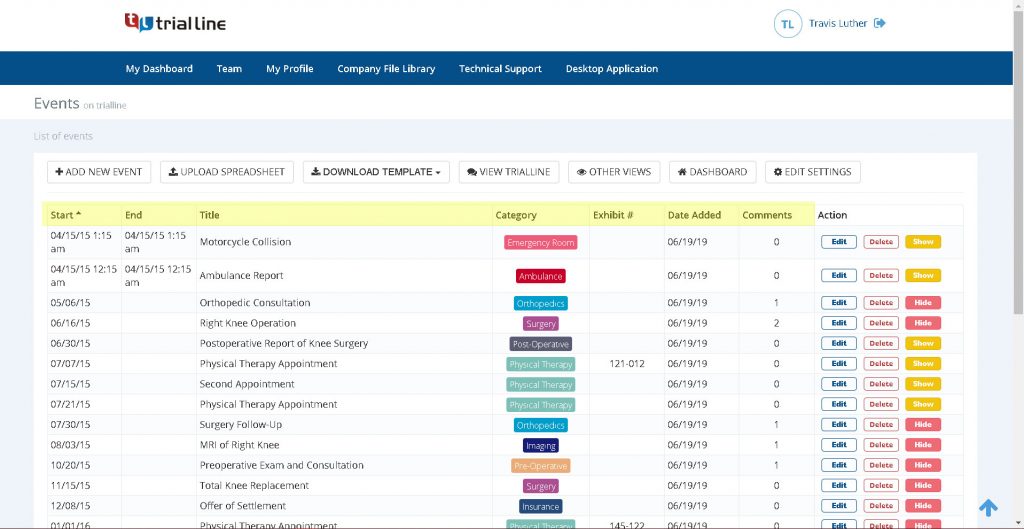
Use a simple spreadsheet initially if needed, but transition to dedicated software for better functionality. TrialLine excels here with its drag-and-drop interface, allowing easy rearrangements as new information emerges. This flexibility is key in dynamic litigation environments where timelines evolve.
Account for overlapping events. In busy cases, multiple occurrences might happen on the same day; stack them logically. This ordered structure forms the core of your legal timeline for litigation, providing a clear path through the case’s history.
Step 4: Adding Details, Evidence, and Annotations
Enrich each event with supporting details. For every entry, include brief descriptions, involved parties, and links to evidence. Attach scans of documents or photos directly if using digital tools.
Annotations are valuable for noting legal implications, such as statute of limitations or potential defenses. Tag entries with categories like “evidence,” “witness,” or “deadline” for easy filtering. In TrialLine, this is built-in, enabling quick searches and custom views.
This layer adds depth to your legal timeline for litigation, transforming it from a basic list into a comprehensive case resource. It also aids in identifying inconsistencies, like conflicting witness statements on dates.
Step 5: Visualizing and Formatting the Timeline
Visualization turns data into insights. Choose a format that suits your needs, such as horizontal lines, Gantt charts, or interactive diagrams. Use colors to differentiate event types red for critical deadlines, blue for communications.
TrialLine offers customizable templates, including full-screen modes for courtroom presentations. Export options allow sharing in PDF or interactive formats. Effective visualization in a legal timeline for litigation can reveal patterns, like repeated delays, that strengthen your arguments.
Test the visual appeal; ensure it’s readable and not cluttered. For juries, simplicity is key avoid overloading with too much text.
Step 6: Reviewing, Refining, and Updating
No timeline is complete without review. Share drafts with colleagues or experts for input. Look for gaps, errors, or biases in event selection.
Refine based on feedback, then test in mock scenarios. Update regularly as litigation progresses with new filings or discoveries. TrialLine’s collaboration tools support version history and real-time edits, ensuring accuracy.
Regular maintenance keeps your legal timeline for litigation relevant and reliable throughout the case.
Leveraging TrialLine for Efficient Timeline Creation
TrialLine stands out as the premier tool for building a legal timeline for litigation. Its cloud-based design means access from any device, with features like event stacking for detailed views and media attachments for rich context. Integrate with systems like Clio for seamless data flow.
Users praise its user-friendly interface and presentation capabilities. For more details, visit the official site: TrialLine.net.
Conclusion
Learning how to create a legal timeline for litigation empowers attorneys to handle cases with precision and confidence. By following these steps and utilizing TrialLine, you can elevate your practice, deliver better results, and tell compelling stories in court. Start building your next timeline today for a competitive edge.