
The email notification pings at 3 AM. Your colleague in a different time zone just updated the case timeline, but they forgot to mention they changed the sequence of events from the depositions. Meanwhile, your paralegal working from home missed the version update entirely and has been working from outdated information. Sound familiar? If you’re managing a remote legal team, you’ve likely experienced this exact scenario—the frustrating reality of coordinating complex case timelines across different locations, devices, and schedules.
Remote legal work has become the new normal. In fact, many law firms have shifted to hybrid or fully remote operations, enabling them to tap into broader talent pools and offer flexibility that attracts top legal professionals. However, this distributed approach creates significant challenges when it comes to how remote legal teams collaborate on case timelines. Without proper systems in place, case information becomes fragmented, team members work with conflicting data, and valuable time is wasted reconciling discrepancies rather than advancing the case.
The good news? With the right strategies and tools, remote legal collaboration on case timelines can be seamless, efficient, and actually enhance your team’s productivity. In this comprehensive guide, we’ll explore proven methods to keep your remote legal team aligned and working effectively together on complex case timelines.
The Unique Challenges of Remote Legal Team Collaboration
Before diving into solutions, it’s important to understand why remote legal teams face distinct challenges when managing case timelines.
Fragmented Information Across Multiple Platforms
In traditional office settings, attorneys naturally gravitate toward a central reference point. However, remote teams often find themselves working across various platforms—email, shared drives, messaging apps, spreadsheets, and document collaboration tools. This fragmentation means case timeline information gets scattered across multiple locations, making it difficult for team members to identify which version is authoritative.
Furthermore, when timeline information lives in spreadsheets or basic document editors, you lose the ability to see real-time updates. A team member might spend two hours organizing events, only to discover later that someone else made conflicting changes that weren’t visible until both versions were merged—a time-consuming and error-prone process.
Communication Lag and Misalignment
Time zone differences create natural communication delays. When your junior associate in California finishes work for the day, your senior attorney in New York is still three hours away from logging off. Meanwhile, your contract attorney in London finished their workday hours ago. These temporal gaps mean questions go unanswered for extended periods, decisions get delayed, and team members often proceed with incomplete information.
Additionally, asynchronous communication can lead to misinterpretations. Without the ability to quickly clarify points in real-time conversations, team members may develop different understandings of timeline sequences, event significance, or documentation requirements.
Version Control Nightmares
Managing multiple versions of case timelines across a distributed team is genuinely difficult. Did this update occur in version 3.2 or version 4.1? Is the timeline your colleague sent you yesterday the most current iteration? When team members email timeline updates, rename files with cryptic naming conventions, or upload different versions to different folders, confusion becomes inevitable.
Consequently, attorneys may find themselves presenting outdated timelines to clients, relying on incorrect event sequences during trial preparation, or making strategic decisions based on incomplete information.
Security and Confidentiality Concerns
Remote work introduces additional security considerations for sensitive legal information. Case timelines contain confidential client information, privileged communications, and sensitive case strategy details. Emailing timeline files, storing them in personal cloud accounts, or accessing them over unsecured networks creates vulnerabilities.
Moreover, when team members work on different devices—laptops, tablets, smartphones—ensuring that everyone has access to the same secure version becomes more complex. Unauthorized access or data breaches involving case timelines could have serious legal and ethical implications.
Establishing Clear Protocols and Workflows
The foundation for successful remote legal team collaboration starts with establishing clear, documented protocols. These frameworks provide structure that technology alone cannot achieve.
Create a Single Source of Truth
First and foremost, designate one authoritative system where all case timeline information lives. Rather than spreading timeline data across multiple platforms, commit as a team to using one primary tool for timeline management. This eliminates confusion about which version is current and ensures everyone knows exactly where to find the definitive case information.
For instance, rather than maintaining timeline information in both a shared Excel file and email updates, consolidate everything into one platform. This single source of truth becomes the reference point your entire team relies on, and it significantly reduces the likelihood of working from outdated information.
Document Timeline Management Standards
Establish clear guidelines for how your team will construct and maintain case timelines. Document standards should include:
- Event sequencing criteria: Define what constitutes a timeline event and the level of detail required
- Dating conventions: Specify how dates should be formatted and handled when exact dates are unknown
- Naming conventions: Create consistent naming patterns for timeline entries
- Documentation requirements: Specify what information must accompany each timeline entry
- Update procedures: Define who can make updates, how frequently updates should occur, and notification processes
Specifically, detail which team members have authority to add, modify, or delete timeline events. Some firms establish a hierarchical approval process where paralegals identify events and attorneys verify them before they’re permanently added to the timeline. Others grant broad edit access but maintain detailed change logs so modifications can be tracked and reviewed.
Implement a Notification and Update System
Additionally, create a structured approach to notifying team members about timeline changes. Rather than assuming people will independently check for updates, establish proactive communication about significant modifications. This might involve:
- Automated notifications when timeline events are added or modified
- Weekly update summaries sent to relevant team members
- Required acknowledgment from key team members when major timeline sections are updated
- Scheduled synchronization meetings where the team reviews significant timeline changes together
Leveraging Technology for Remote Timeline Collaboration
While protocols and procedures are essential, the right technology dramatically improves remote collaboration efficiency.
Cloud-Based Timeline Solutions Over Traditional Tools
Traditional approaches to case timeline management—using spreadsheets, word documents, or email attachments—simply don’t work well for remote teams. These tools lack the collaboration features necessary for seamless distributed teamwork. Specifically, consider how spreadsheets handle simultaneous editing: conflicts emerge, version control becomes confusing, and real-time collaboration is either impossible or generates errors.
In contrast, cloud-based legal timeline software designed specifically for attorneys provides real-time collaboration capabilities. These platforms allow multiple team members to view and edit timelines simultaneously from different locations. Changes appear instantly for all users, eliminating version confusion and ensuring everyone always works with current information.
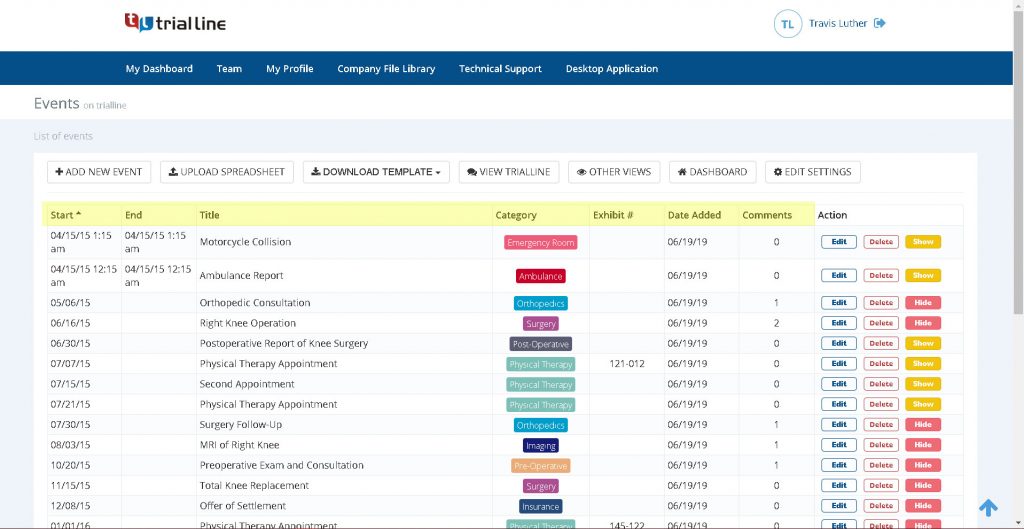
Cloud-based solutions like TrialLine offer additional advantages that matter for remote teams. First, they’re accessible from any internet-connected device—computers, tablets, or smartphones. This means attorneys can review and contribute to case timelines from client meetings, depositions, or courtrooms, not just from their home offices. Second, cloud platforms automatically save all changes and maintain complete version histories, so you can see exactly what changed, when it changed, and who made the change. Therefore, if a modification creates a problem, reverting to previous versions is straightforward.
Integration with Document Management Systems
Furthermore, select a timeline platform that integrates with your existing document management workflows. Rather than creating timelines in isolation, you want a system that allows you to attach supporting documents, evidence, and exhibits directly to timeline events. When your team member clicks on a particular event, they should be able to immediately access the deposition transcript excerpt, email correspondence, or contract language that supports it.
This integration eliminates the tedious process of jumping between systems to understand what happened on a particular date. Everything relevant to an event exists in one accessible location, significantly improving efficiency.
Mobile Access and Offline Capabilities
Modern legal practice demands that attorneys access case information on the go. Your team should be able to review timelines during brief breaks, while traveling between offices, or from client locations. Subsequently, ensure your timeline solution functions effectively on mobile devices with intuitive interfaces designed for smaller screens.
Additionally, some legal professionals work in environments with unreliable internet connectivity. Look for solutions that offer offline capabilities, allowing users to view and annotate timelines when disconnected, with automatic synchronization when connectivity returns.
Structuring Effective Remote Collaboration Workflows
Having the right tools is only part of the solution. The way you structure actual collaboration workflows determines whether remote teams truly work together effectively.
Asynchronous-First Collaboration Model
Indeed, successful remote teams embrace asynchronous-first collaboration, recognizing that real-time interaction isn’t always necessary or efficient. Rather than scheduling constant meetings or expecting immediate responses, design your timeline workflows to function smoothly with asynchronous updates.
For example, paralegals might review documents daily and add identified events to the shared timeline with detailed documentation. Attorneys might review and approve these additions the next morning, leaving comments and questions in the platform itself rather than sending separate emails. This approach respects different time zones, allows people to work during their most productive hours, and creates a documented record of all decisions and discussions.
Designated Review and Approval Cycles
Establish regular review and approval cycles for timeline updates. Rather than treating the timeline as a live document that changes randomly, create predictable rhythms around timeline management. You might establish Tuesday and Thursday evenings as “timeline update windows” when changes are submitted, and Wednesday and Friday mornings as “review and approval windows” when changes are evaluated.
This predictability helps team members organize their work and ensures that changes don’t get lost in the shuffle. Moreover, it creates natural checkpoints where the team collectively ensures timeline accuracy rather than relying on individual quality control.
Role-Specific Access and Responsibilities
Clarity about who does what significantly improves remote collaboration. Specifically, define distinct roles and responsibilities:
- Timeline administrators manage system settings, user permissions, and overall timeline structure
- Content contributors add new events based on document review or client interviews
- Reviewers verify accuracy and completeness of timeline entries
- Trial team leads prepare timeline sections for presentation and ensure alignment with case strategy
By clearly delineating these roles, you prevent duplication of effort, reduce confusion about who should handle specific tasks, and ensure accountability. Team members know exactly what they’re responsible for and understand what they should expect from colleagues.
Best Practices for Maintaining Timeline Accuracy and Consistency
Remote teams face heightened risks around timeline accuracy. Without in-person verification and casual hallway consultations, errors can persist undetected.
Regular Verification and Audit Processes
First, implement scheduled verification processes where the team collectively reviews timeline sections for accuracy. Rather than waiting until trial preparation to discover errors, establish monthly or quarterly review cycles where assigned team members carefully verify timeline entries against source documents.
For instance, your litigation team might dedicate the first Friday of each month to timeline verification, where each attorney reviews the entries they contributed during the previous month and confirms that dates, event descriptions, and supporting documentation are accurate.
Collaborative Quality Assurance
Moreover, build quality assurance into your collaborative workflow. When someone proposes a new timeline event, other team members should have opportunities to question, verify, or supplement the information. Platforms that support commenting and discussion around individual timeline entries facilitate this collaborative verification.
Likewise, if your timeline platform includes search and filtering capabilities, use these regularly to ensure consistency. Search for all events from a particular date range or involving a specific party, then verify that the timeline accurately captures all relevant occurrences.
Version History and Change Tracking
Undoubtedly, comprehensive change tracking is essential for remote teams. Ensure your timeline platform maintains detailed version histories showing exactly what changed, when it changed, and who made the change. This historical record serves multiple purposes:
- Accountability: Team members understand that changes are tracked, encouraging careful, intentional modifications
- Error correction: If problems emerge, you can identify where and when they were introduced
- Dispute resolution: If team members disagree about timeline accuracy, the version history provides objective evidence
- Audit compliance: Detailed change logs demonstrate that your firm maintains rigorous document and information management practices
Remote Team Communication Strategies
Effective remote collaboration on case timelines requires thoughtful communication approaches.
Establishing Communication Norms
To begin with, establish clear norms about how your team will communicate around timeline updates. For instance, decide whether timeline-related questions should be posed within the timeline platform itself, in email, or in Slack. Consistency matters tremendously—if timeline discussions scatter across multiple communication channels, information gets lost and team members miss important context.
Similarly, establish expectations around response times. Remote teams function better when people understand that not everything demands an immediate response. If someone poses a timeline question, what’s the expected turnaround for a reply? Is it same-day, next-business-day, or within 48 hours? Clear expectations reduce anxiety and improve planning.
Scheduled Synchronization Meetings
Although asynchronous collaboration is efficient, scheduled synchronization meetings add tremendous value. These don’t need to be frequent or lengthy—perhaps a 30-minute meeting every other week—but they create opportunities for real-time discussion of complex timeline issues.
During these meetings, team members can collectively discuss ambiguous events, debate the significance of particular occurrences, or clarify conflicting information. The synchronous conversation often resolves in minutes what might take days through asynchronous comments.
Documentation of Decisions and Reasoning
Furthermore, ensure that major timeline decisions are documented in writing, not merely discussed in meetings. When the team collectively decides that a particular event should be included in the timeline, or that two events should be combined, document the reasoning. This documentation helps new team members understand the timeline structure and prevents rehashing previous decisions.
How TrialLine Solves Remote Collaboration Challenges
Cloud-based legal timeline software addresses many of the collaboration challenges remote teams face. TrialLine, specifically designed for legal professionals, offers features that streamline remote team collaboration on case timelines.
The platform’s cloud-based architecture means your entire team accesses the same timeline from anywhere with internet connectivity. Rather than managing multiple versions, everyone works with a single, constantly updated timeline. When one team member adds an event with supporting documentation, every other team member sees that update immediately.
Moreover, TrialLine’s collaboration features allow multiple attorneys and paralegals to work on the same timeline simultaneously. Team members can add events, attach documents, and leave comments without worrying about version conflicts or overwriting others’ work. This real-time collaboration capability fundamentally changes how remote teams work together on complex cases.
The platform’s document integration features mean that supporting evidence, deposition excerpts, and other case materials can be attached directly to timeline events. This eliminates the need for team members to juggle multiple systems or search through shared drives to understand what happened on a particular date.
Additionally, TrialLine’s accessibility across devices means attorneys can review and contribute to case timelines from courtrooms, client meetings, or while traveling. The intuitive interface works seamlessly on computers, tablets, and smartphones, so your team isn’t limited to desktop work.
The detailed change tracking and version history features provide accountability and create an audit trail that demonstrates your firm’s commitment to careful case management. When timeline disputes arise, you have objective documentation of how the timeline evolved.
Conclusion: Building Remote Teams That Collaborate Seamlessly on Case Timelines
Remote legal teams can absolutely collaborate effectively on complex case timelines—but success requires intentional strategy, clear protocols, and appropriate technology. To summarize, the most successful remote legal teams:
- Establish a single source of truth where all timeline information lives
- Document clear standards and procedures for timeline management
- Implement cloud-based solutions specifically designed for legal collaboration
- Structure workflows that accommodate asynchronous work and different time zones
- Maintain rigorous quality assurance through verification and collaborative review
- Communicate intentionally through consistent channels and scheduled synchronization
The challenges of remote legal collaboration are real, but they’re absolutely solvable with the right approach. By combining thoughtful protocols with appropriate technology, your remote legal team can maintain timeline accuracy and consistency while actually improving efficiency and team satisfaction.
If your firm is struggling with how to keep remote teams aligned on complex case timelines, consider exploring a cloud-based legal timeline platform like TrialLine. The right tool can transform timeline management from a source of frustration into a competitive advantage, allowing your team to focus on what matters most: developing winning case strategies and delivering excellent client service.
Ready to streamline your remote team’s case timeline collaboration? Visit TrialLine today to see how cloud-based legal timeline software can transform your firm’s case management practices. Your remote team—and your clients—will appreciate the efficiency gains and improved accuracy that come with a purpose-built platform designed specifically for attorneys.