
You know the feeling. You open a folder—digital or physical—and you’re staring at three thousand documents. There are emails from five years ago, redacted PDFs, handwritten notes, and a series of deposition transcripts that seem to contradict each other. It’s not just a “document dump”; it’s a mountain of noise. Your job is to find the signal in that noise, but the sheer volume makes it feel impossible.
Most lawyers handle this the old-fashioned way. You start a massive spreadsheet. Column A is the date, Column B is the event, and Column C is the document reference. But spreadsheets are static. They don’t breathe. The moment you add a new piece of evidence that shifts the sequence of events, you’re spending an hour shifting cells and updating references. When you try to explain this timeline to a partner or a client, you’re scrolling through hundreds of rows of text, hoping they can visualize the gap in the story you’re trying to highlight.
This is where the disconnect happens. A case isn’t a list; it’s a story. And the most powerful stories in a courtroom are told through a clear, logical sequence of events. If you can’t see the timeline, you can’t see the holes in the opposition’s argument. You’re essentially flying blind, relying on your memory and a few highlighted pages to guide your strategy.
The real challenge isn’t just organizing the data—it’s transforming that data into a dynamic tool you can actually use during a deposition or a trial. You need a way to turn those massive document dumps into dynamic case timelines that allow you to pivot instantly, link evidence directly to events, and collaborate with your team without emailing “Timeline_Version_12_FINAL_v2.xlsx” back and forth.
The Psychology of the Timeline: Why Chronology Wins Cases
Before we get into the “how,” let’s talk about the “why.” Why are we so obsessed with timelines? It’s because the human brain is wired for narrative. Judges and juries don’t necessarily care about a list of facts; they care about how one event led to another. They want to know: Why did the defendant send that email three days after the board meeting?
When you present a case as a chronological sequence, you aren’t just giving information; you’re building a persuasive argument. You are showing cause and effect. If you can demonstrate a pattern of behavior—say, a series of ignored warnings followed by a catastrophic failure—the conclusion becomes inevitable for the listener.
Identifying the “Silent” Evidence
One of the biggest advantages of building a dynamic timeline is discovering what isn’t there. When you plot every known event on a visual line, the gaps jump out at you.
Imagine a commercial litigation case where a contract was breached. You plot the emails and the meetings. Suddenly, you notice a three-week silence in November. Why did communication stop? Did the parties reach a verbal agreement they aren’t mentioning? Was there a secret negotiation? In a spreadsheet, a gap is just a jump in dates. In a visual timeline, a gap is a question that needs an answer.
Reducing Cognitive Load for the Court
Judges are overworked and exhausted. If you hand them a 50-page brief that requires them to flip back and forth between the statement of facts and the exhibits to understand the timing, you’re making them work too hard.
When you can present a clear, visual chronology—or better yet, reference one during oral arguments—you reduce the cognitive load on the judge. You make it easy for them to agree with you because you’ve already done the hard work of organizing the truth.
The Traditional Struggle: Why Spreadsheets and Folders Fail
For decades, the “gold standard” for case organization was the Excel sheet or the physical chronology folder. While these tools are better than nothing, they have fundamental flaws that actually hinder a lawyer’s ability to litigate effectively.
The “Static Data” Problem
A spreadsheet is a grid. It’s great for accounting, but it’s terrible for storytelling. As a case evolves, your timeline changes. You discover a new email that proves a meeting happened on Tuesday instead of Thursday. In a static system, you change the date, but you don’t necessarily see how that change ripples through the rest of the case. You lose the “big picture” because you’re too focused on the cell you’re editing.
The Disconnect Between Event and Evidence
This is perhaps the most frustrating part of traditional case management. You have your timeline in one file and your documents in another. To verify a fact, you have to:
- Find the row in the spreadsheet.
- Note the exhibit number (e.g., “Ex. 402”).
- Open your document management system.
- Search for “Ex 402.”
- Scroll to the relevant page.
By the time you’ve found the document, you’ve lost the flow of your thought process. In a high-pressure environment like a deposition, this delay is lethal. You need the evidence and the event to be the same thing.
The Collaboration Nightmare
Legal work is rarely a solo effort. You have associates, paralegals, and co-counsel. When multiple people are updating a master spreadsheet, things break. Someone accidentally deletes a row; someone else uses a different date format; someone forgets to upload the latest version to the shared drive. You spend more time managing the document than you do managing the case.
Step-by-Step: How to Process a Document Dump into a Timeline
Turning 10,000 pages of discovery into a working timeline requires a system. You can’t just start typing; you’ll get overwhelmed. Here is a professional workflow for breaking down a massive document dump.
Phase 1: The Initial Triage
Don’t try to extract every single detail in the first pass. You’ll burn out. Start with a “high-level” pass.
- Filter by Date: Use your document software to sort everything by date created or date sent.
- Identify Anchor Events: Look for the big markers. The date the contract was signed, the date the accident happened, the date the lawsuit was filed. These are your “anchors.” Once these are in place, everything else just fits around them.
- Flag “Hot” Documents: As you skim, mark documents that seem critical. Don’t analyze them yet—just flag them so you know where the meat of the case is.
Phase 2: The Detail Extraction
Now you go deep. For every relevant document, extract the “Who, What, When, and Where.”
- Who: Who sent it? Who received it? Who was BCC’d?
- What: What is the core claim or action in this document? (Keep this to one sentence).
- When: Exact date and time. If the document is undated but you can infer the date from the context, note that as an “approximate” date.
- Where: Is there a location mentioned? A specific office or city?
Phase 3: Building the Sequence
This is where you move from a list to a timeline. Instead of just logging the event, start asking why it matters.
For example, don’t just write: “Jan 12: Email from CEO to Manager.”
Write: “Jan 12: CEO warns Manager about safety violations (Contrast with later testimony where Manager claims he was unaware).”
By adding the “why” to your timeline entry, you are turning a factual log into a strategic map.
Phase 4: Linking and Verifying
The final step is the “link.” Every single entry in your timeline must be tied to a piece of evidence. If you have a timeline entry that doesn’t have a supporting document, it’s not a fact—it’s an allegation.
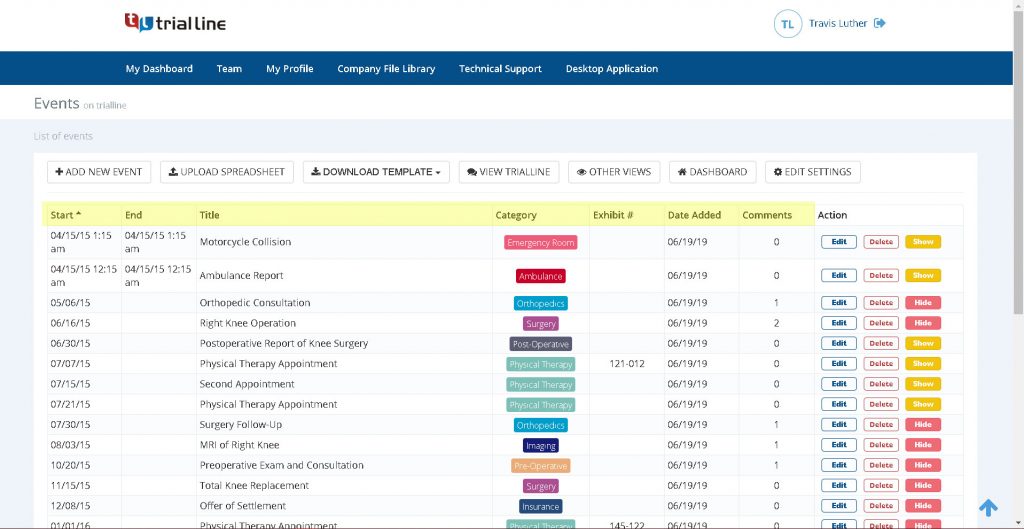
This is where tools like TrialLine become indispensable. Instead of writing “See Exhibit 12,” you simply attach the PDF of Exhibit 12 to the event on the timeline. If you’re in court and the opposing counsel challenges a date, you don’t fumble through folders. You click the event, and the document pops up instantly.
Moving to the Cloud: Why Specialized Legal software Beats General Tools
You’ve probably thought about using Trello, Asana, or even a shared Google Doc. These are great for managing a marketing campaign or a grocery list, but they aren’t built for the rigors of legal discovery.
The Need for “Legal-First” Design
General project management tools are built around “tasks” (To-Do, Doing, Done). But a legal case isn’t a list of tasks; it’s a sequence of events. When you use a general tool, you’re trying to force a square peg into a round hole. You end up spending more time “hacking” the software to work for you than actually using it to build your case.
TrialLine is different because it was built specifically for attorneys. It understands that the primary unit of a case is the event, not the task. It understands that a document isn’t just an attachment; it’s the evidence that proves the event happened.
Accessibility and the “Courtroom Effect”
Think about the last time you were in a deposition or a courtroom. You probably had a laptop, a few notebooks, and a stack of binders. How much time did you spend saying, “One moment, let me find that,” while you flipped through pages?
Cloud-based software changes the game. Because TrialLine is accessible from any internet-connected device, your timeline is in your pocket. Whether you’re on a tablet at the counsel table or a smartphone in the hallway during a break, you have the entire case chronology and all linked documents at your fingertips. This allows you to be more agile, more confident, and significantly more dangerous during cross-examination.
Real-Time Synchronization
In a fast-moving case, information changes hourly. Your associate might find a new set of emails while you’re in a meeting with the client. With a cloud-based system, the moment that associate updates the timeline, it’s updated for everyone. There is one single version of the truth. This eliminates the “which version is the latest?” conversation and ensures that your entire team is operating on the same set of facts.
Advanced Strategies for Complex Litigation
When you’re dealing with truly massive cases—corporate fraud, multi-district litigation, or complex IP disputes—a single linear timeline might not be enough. You need to get creative with how you visualize the data.
Using Multiple “Tracks” or Layers
In a complex case, you often have several different stories happening simultaneously. For example, in an employment dispute, you might have:
- The plaintiff’s performance review timeline.
- The company’s internal policy changes timeline.
- The communication timeline between the plaintiff and the supervisor.
Instead of cramming all of this into one long line, use different “tracks.” By layering these timelines, you can see where they intersect. Did the company change the performance policy right before they fired the employee? When these two separate tracks align, you’ve found your “smoking gun.”
Filtering for Clarity
A timeline with 500 events is just as overwhelming as a document dump. The secret is knowing how to filter.
You should be able to toggle views. For the jury, you want a “Simplified View” that only shows the 20 most critical events. For your internal team, you want the “Detailed View” that includes every minor email and phone call. Being able to filter by “Person,” “Document Type,” or “Case Theme” allows you to tailor the story to the audience.
The “Gap Analysis” Technique
Once your timeline is populated, spend a dedicated session doing “Gap Analysis.” Look at the white space between events.
- The Silence Gap: A period where communication stopped abruptly.
- The Reaction Gap: The time between a critical event (like a crash) and the first response (like an email). Was the response too slow? Was it suspiciously fast?
- The Contradiction Gap: When a witness says “I never spoke to him in January,” but your timeline shows three emails exchanged in that month.
When you present these gaps to opposing counsel, you aren’t just arguing; you’re demonstrating.
Common Mistakes When Building Case Timelines
Even with the right software, it’s easy to fall into traps that make your timeline less effective. Avoid these common pitfalls.
1. Including Too Much “Noise”
It’s tempting to put every single email into the timeline just to be thorough. Don’t do this. If an email just says “Thanks!” or “See you at 2 PM,” it doesn’t belong on the timeline.
Your timeline should be a map of meaningful events. If you clutter it with administrative noise, you lose the ability to see the patterns. Keep your “master” data in your document management system, but only promote the strategically relevant points to your timeline.
2. Relying on Summary Instead of Evidence
Never enter a timeline event based on a witness’s memory without a document to back it up. Memory is faulty; documents are permanent.
If a client tells you, “I remember calling him in March,” put it in, but mark it as “Unverified/Testimonial.” Once you find the phone log, update it to “Verified.” This prevents you from accidentally presenting an unsupported “fact” as truth in court.
3. Forgetting the “Non-Event”
Sometimes, the fact that something didn’t happen is the most important part of the case.
If a company was required by law to file a report every 30 days, and they didn’t file one in June, that is an event. Log it as: “June 30: Deadline for Monthly Report (NOT FILED).” This turns an absence of action into a tangible piece of evidence.
4. Working in a Vacuum
Lawyers often build their timelines in isolation and then “reveal” them to the team. This is a mistake.
The best timelines are collaborative. Your paralegal might notice a detail in a document that you missed. Your co-counsel might remember a deposition answer that changes the significance of a date. By using a collaborative platform like TrialLine, the timeline becomes a living document that the whole team improves in real-time.
Comparing the Options: Spreadsheet vs. General PM Tool vs. TrialLine
If you’re still on the fence about switching your workflow, let’s look at how these three approaches stack up against each other.
| Feature | Spreadsheets (Excel/Sheets) | General PM Tools (Trello/Asana) | TrialLine |
| :— | :— | :— | :— |
| Chronological Focus | Manual (Sorting) | Poor (Board/List view) | Native (Timeline first) |
| Document Linking | Hyperlinks (clunky) | Simple Attachments | Deep Integration/Direct View |
| Visual Presentation | None (just rows) | Kanban/Gantt (not legal) | Dynamic Legal Timeline |
| Collaboration | Version Conflict risk | High | Seamless/Real-time |
| Accessibility | File-based | App-based | Cloud-based (any device) |
| Legal Specificity | None | None | Built for Attorneys |
| Speed of Update | Slow/Manual | Medium | Fast/Dynamic |
A Practical Example: The Intellectual Property Dispute
To see this in action, let’s imagine a case involving a trade secret theft. You’ve been dumped with 5,000 emails, a dozen Slack exports, and several hard drives of forensics data.
The Spreadsheet Approach
You spend two weeks building a sheet. You have 400 rows. During the deposition of the defendant, you ask about an email from August 14th. You scroll… scroll… scroll… find the row. You see “Ex. 89.” You go to your PDF viewer, search for “Ex 89,” and find it. The transition took 45 seconds. The momentum of the questioning is gone.
The TrialLine Approach
You’ve imported the key dates into TrialLine and attached the corresponding PDFs. During the deposition, you click the “August 14” event on your tablet. The email pops up instantly on your screen. You read the quote, then ask the next question. The transition takes two seconds. You maintain control of the room, and the witness feels the pressure because you are clearly more organized than they are.
Furthermore, while building this, you noticed a “track” of Slack messages that happened simultaneously with the formal emails. You saw that while the defendant was emailing the client saying “Everything is on track,” they were Slacking a co-conspirator saying “We need to move the data before they notice.” Because you had both streams of communication mapped on one timeline, the contradiction was obvious.
Frequently Asked Questions about Legal Timelines
Q: How do I handle cases where the exact date of an event is unknown?
A: This is common. Most legal professionals use “approximate” dates or “date ranges.” In a professional timeline tool, you can often mark an event as “Circa [Date]” or place it in a floating window. The important thing is to be transparent about the uncertainty so you aren’t caught off guard during cross-examination.
Q: Is it a security risk to put case data in the cloud?
A: It’s a valid concern. However, modern legal cloud software uses encryption and security protocols that are often far superior to a local hard drive or an unencrypted Excel file sitting on a laptop. When choosing a provider, look for automatic backups, secure login protocols, and a clear privacy policy that ensures they don’t own your data.
Q: Do I need to input every single document into the timeline?
A: No. Your timeline is your “strategic map,” not your archive. Use your document management system for the archive and your timeline for the narrative. Only include documents that prove, disprove, or provide context to the key events of the case.
Q: Can I export my timeline for use in a trial exhibit?
A: Yes. A dynamic timeline is for your internal strategy and flexibility, but you can often export specific views or screenshots to create a “static” version for the jury. The beauty is that the static version you give the jury was built from the dynamic version you used to master the facts.
Q: How much time does it actually take to set up a timeline for a medium-sized case?
A: The initial “triage” and “anchor” phase takes a few hours. The deep extraction takes longer depending on the volume. However, the time you spend upfront is recovered tenfold during the drafting of the brief and the actual trial. You stop searching for papers and start using the facts.
Final Takeaways: Stop Searching and Start Strategizing
The difference between a good lawyer and a great lawyer often comes down to who knows the facts better. In the age of “big data” and massive document dumps, knowing the facts isn’t about how much you can remember—it’s about how you organize the information.
If you’re still relying on a spreadsheet, you’re not just using outdated technology; you’re limiting your ability to see the case clearly. You’re spending your most valuable asset—your time—on administrative data entry instead of strategic analysis.
To turn your next document dump into a competitive advantage, remember these key shifts:
- From Lists to Narratives: Stop thinking of your case as a list of events. Think of it as a story where every event is a plot point.
- From Disconnected to Integrated: Stop separating your timeline from your evidence. Link them so that the fact and the proof are one and the same.
- From Static to Dynamic: Stop using tools that require manual updates and version control. Move to a cloud-based system that evolves as your case does.
- From Solo Effort to Team Synergy: Use a collaborative platform so that every associate and paralegal is contributing to a single, unified version of the truth.
The goal isn’t to have a “pretty” timeline. The goal is to enter every deposition, every hearing, and every trial with the absolute certainty that you know exactly what happened, when it happened, and exactly where the proof is located.
If you’re ready to stop drowning in PDFs and start dominating your case strategy, it’s time to move your chronology into the cloud. TrialLine was built for this exact purpose—giving attorneys the power to transform chaos into a clear, actionable, and winning sequence of events. Don’t let a document dump hide the truth of your case. Map it out, visualize the gaps, and take control of the narrative.