Handling unlawful termination cases requires careful documentation, strategic organization, and a clear presentation of evidence. Also known as wrongful termination, this occurs when an employee is fired for reasons that violate employment laws or public policy—for example, being dismissed due to their race or as retaliation for whistleblowing.
Determining the exact number of unlawful termination cases can be difficult due to underreporting and varying legal definitions across jurisdictions. However, estimates suggest that around 250,000 workers in the United States are wrongfully terminated each year.
For employment law professionals, legal timeline software has become a valuable tool in managing these complex cases. Unlawful termination claims often involve multiple key events, critical actions, and legal arguments that must be carefully tracked. In this article, we’ll explore how legal timeline software helps build a well-structured case strategy for stronger legal outcomes.
Why Legal Timeline Software is Essential for Unlawful Termination Cases
A wrongful termination lawsuit and case require careful organization of key events and supporting evidence, including employment records, termination documents, and communication records. With a vast amount of information to manage, legal timeline software streamlines the possess, ensuring all critical details are properly structured and analyzed.
Organizing Key Case Events Chronologically
One of the key benefits of legal timeline software is its ability to organize case events in a precise, chronological structure, ensuring clarity and coherence in complex employment disputes. These cases often involve a series of critical incidents occurring over extended periods, making proper documentation essential. With the support of case management software for lawyers, attorneys can:
- Accurately track pivotal events, such as contract initiation, performance evaluation, workplace disputes, and termination dates.
- Link crucial evidence– including emails, performance reviews, witness statements, and corporate policies– to specific points in the timeline.
- Identify inconsistencies in the employer’s defense by cross-referencing documentation.
Strengthening Evidence-Based Arguments
Successfully litigating a wrongful termination case relies on presenting clear, well-documented evidence that substantiates claims of unlawful conduct. Legal timeline software empowers attorneys to:
- Establish a pattern of discriminatory or retaliatory behavior by mapping key incidents over time.
- Demonstrate causation between an employer’s protected activity– such as whistleblowing or filing a formal complaint– and their termination.
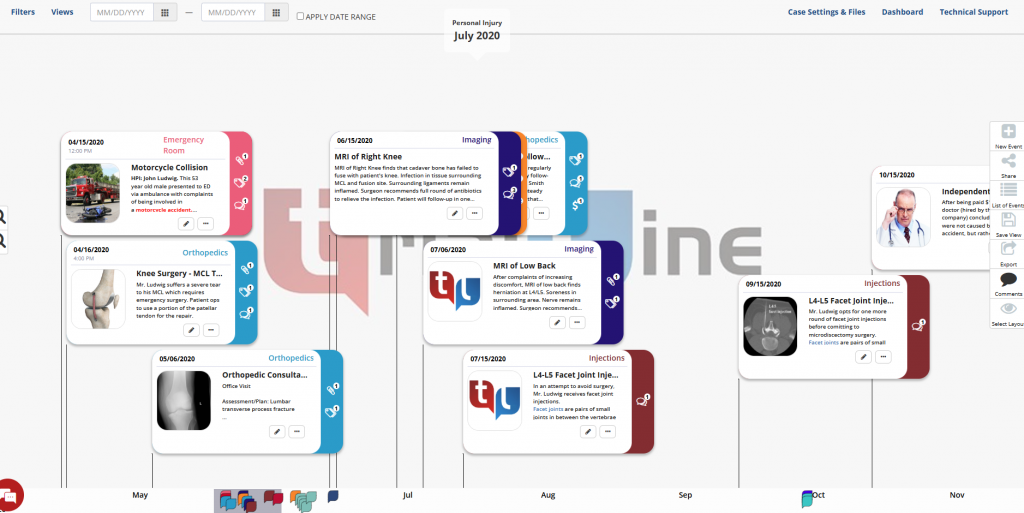
- Create a visually compelling timeline that enhances clarity and persuasion for judges, juries, and opposing counsel.
Enhancing Collaboration Between Legal Teams
Legal disputes, particularly wrongful termination cases, require seamless coordination among multiple stakeholders, including attorneys, paralegals, expert witnesses, and clients. Employment law software, like legal timeline software, has significantly improved case collaboration by providing:
- Real-time document sharing and updates, ensuring all parties have access to the latest case developments.
- Secure access control, ensuring confidentiality.
- Role-based permissions, allow attorneys to assign varying levels of access based on each team member’s role and responsibilities.
How to Use Legal Timeline Software Effectively in an Unlawful Termination Case
Effectively utilizing legal timeline software in wrongful termination cases ensures a well-organized, evidence-based case strategy. Follow these steps to streamline case preparation and strengthen your legal arguments:
Step 1: Gather All Relevant Documents
Start by collecting all documentation related to the case, including:
- Employment contracts and company policies to establish terms and conditions.
- Performance reviews and disciplinary records to assess the employee’s history.
- Emails, internal messages, and HR reports to identify relevant communications.
- Witness statements that provide firsthand accounts of workplace events.
Step2: Identify and Log Key Events
Using the timeline software to input critical case milestones, such as:
- Start and end dates of employment to establish the case’s timeline.
- Promotions, demotions, and performance evaluations to track the employee’s trajectory.
- Complaints or reports are filed by the employee to establish a potential link to retaliatory actions.
Step 3: Link Supporting Evidence
Attach relevant documents, emails, and witness statements to specific events within the timeline. This ensures a structured , easily navigable case file that strengthens legal arguments.
Step 4: Analyze Patterns and Identify Legal Violations
Utilize the software’s analytical tools to uncover:
- Patterns of discrimination or retaliation, such as adverse actions following a complaint.
- Inconsistencies in the employer’s defense, highlighting contradictions in documentation.
Step 5: Prepare for Court or Settlement Negotiations
With a well-structured timeline, attorneys can present compelling visual evidence, that simplifies complex case details. This enhances courtroom arguments, strengthens settlement negotiations, and improves overall case outcomes.
Best Legal Timeline Software for Employment Disputes
Selecting the right legal timeline software is crucial for organizing case details, streamlining evidence management, and enhancing litigation strategies in wrongful termination cases. Below are some of the most effective tools available, each offering unique features to support legal professionals.
TrialLine
A cloud-based case management solution designed to structure complex legal timeline efficiecently.
Key Features:
- Secure, cloud-based case timeline organization for seamless collaboration.
- Easy document linking to key events for streamlined case preparation.
- Controlled access for clients and legal teams, ensuring confidentiality.
Casemap
An advanced evidence mapping tool that enhances trial preparation and legal analysis.
Key Features:
- Comprehensive evidence mapping and linking for building strong legal arguments.
- Customizable reports to support litigation and case presentation.
- AI-powered analysis tools to identify inconsistencies and strengthen case strategy.
Timeline Maker Pro
A user-friendly timeline software focused on visual case organization and presentation.
Key Features:
- Intuitive interface for creating professional legal timelines.
- Multiple export formats, including presentations, for courtroom use.
- Enhance data security to protect confidential case materials.
SmartDraw Legal Edition
A versatile legal timeline tool for professional templates for streamlined case management.
Key Features:
- Pre-designed professional timeline templates for quick setup.
- Seamless integration with Microsoft Office and cloud storage platforms.
- Drag-and-drop functionality for ease of use and efficiency.
What to Do When You Are Involved in a Wrongful Termination Case
If you believe you have been wrongfully terminated, taking the right steps early can significantly strengthen your case. Follow these key actions to protect your rights and build a strong legal claim.
- Review Your Employment Documents.
- Carefully examine your employment contact, offer letter and company policies to determine whether your termination violated any agreements or workplace rules.
- Review the employee handbook to understand company policies regarding termination, disciplinary procedures, and grievance reporting.
- Document Everything
- Record the date, time and circumstances surrounding your termination.
- Gather relevant documentation, including:
- Termination letter (if provided)
- Performance reviews and disciplinary records to refute claims of misconduct or poor performance.
- Emails, text messages, and internal memos related to your employment and dismissal.
- Witness statements from coworkers who may support your claims.
- Identify Potential Legal Violations
A termination may be unlawful it was based on:
- Discrimination (e.g., race, gender, age, disability, religion or other protected characteristics).
- Retaliation for reporting workplace violations, harassment or whistleblowing.
- Violation of an employment contract or company policies.
- Constructive discharge, where an employer created intolerable working to force you to resign.
- File a Complaint with Appropriate Agency
- If discrimination or retaliation is involved , file complaint with Equal Employment Opportunity Commision (EEOC) or state’s labor board.
- Certain claims may require filling deadlines, so act promptly to preserve your legal rights.
- Consult an Employment Law Attorney
- An experience employment law attorney can assess your case, determine the best legal strategy, and help you seek compensation or reinstatement.
- Legal timeline software can assist in organizing key events and evidence, strengthening your claim in court of settlement negotiations.
- Consider Settlement of Legal Actions
- Many wrongful termination cases are resolved through settlements negotiations, where employees may recieve compensation for lost wages and damages.
- If necessary,your attorney may pursue legal action through civil litigation to protect your rights and secure justice.
By taking these steps, you can proactively protect yourself and improve your chances of a favorable outcome in a wrongful termination lawsuit. If you believe your termination was unlawful, seeking legal counsel as soon as possible is essential to safeguarding your rights.
Building a Stronger Case Starts Here
Successfully handling unlawful termination cases require more than just legal expertise—it demands organization, strategy, and the ability to present a clear, compelling argument. Legal timeline software plays a crucial role in streamlining case preparation, allowing attorneys and legal teams to document key events, organize evidence, and build strong, evidence-based arguments. By visualizing the timeline of events, attorneys can effectively demonstrate patterns of misconduct, inconsistencies in the employer’s actions, and violations of labor laws. This level of clarity not only strengthens the case but also increases the chances of securing a favorable outcome for clients. Additionally, timeline software fosters seamless collaboration among legal professionals, ensuring that everyone involved has access to the most up-to-date case information. With the right tools, legal teams can work more efficiently, reduce errors, and stay ahead in complex employment disputes.
TrialLine offers a comprehensive solution designed specifically for legal professionals handling employment disputes, including unlawful termination cases. With its intuitive interface, powerful visualization tools, and secure cloud-based access, TrialLine simplifies case management while enhancing legal strategy. Whether you are an attorney, a paralegal, or an HR professional involved in employment litigation, TrialLine can help you stay organized and present your case with confidence. Don’t leave your case to chance—sign up for a free trial or schedule a demo with one of our experts today to see how TrialLine can transform the way you manage and litigate wrongful termination cases.