How to Organize Complex Case Timelines in Minutes

Master complex case timelines in minutes, not hours. Discover proven strategies to organize litigation documents and find answers instantly.

Picture this: You’re three weeks into a complex litigation matter, and your client just asked you a straightforward question about the sequence of events leading to the dispute. Instead of providing an immediate answer, you find yourself digging through dozens of emails, court documents, depositions, and evidence files scattered across your case folder. Thirty minutes later, you’ve pieced together a rough timeline, but you’re not entirely confident you haven’t missed anything. Meanwhile, your hourly rate is ticking away on administrative work instead of strategic case analysis.

This scenario plays out in law firms and legal departments every single day. Organizing complex case timelines is one of the most time-consuming yet essential aspects of litigation practice. Whether you’re handling personal injury cases, commercial disputes, employment matters, or intellectual property litigation, the ability to quickly visualize and understand the chronological sequence of events can make or break your case strategy.

In this comprehensive guide, we’ll explore practical strategies for organizing case timelines efficiently, discuss why timeline organization matters more than many attorneys realize, and show you how modern legal technology can compress hours of work into minutes.

Why Case Timeline Organization Matters More Than You Think

Before diving into the mechanics of timeline organization, it’s important to understand why this seemingly administrative task carries such significant weight in legal practice.

The Hidden Cost of Disorganized Case Information

Consider the typical attorney’s workflow: Legal professionals juggle multiple cases simultaneously, each containing hundreds or thousands of individual documents. Without a structured approach to timeline organization, critical case information becomes fragmented across various storage locations—email inboxes, document management systems, shared drives, and physical files.

Consequently, when you need to recall a specific sequence of events, your brain must work inefficiently to reconstruct the timeline from memory and scattered documentation. This cognitive burden doesn’t just cost time; it increases the risk of overlooking crucial details or misremembering the precise sequence of events.

Furthermore, when your timeline understanding is incomplete or uncertain, you may:

  • Miss opportunities to strengthen your case narrative
  • Fail to identify evidentiary gaps that need to be filled
  • Present contradictory information to clients or opposing counsel
  • Spend unnecessary time preparing multiple versions of the timeline

The Strategic Advantage of Clear Chronology

In contrast, attorneys who maintain organized, accessible case timelines gain a significant competitive advantage. Research in litigation support and legal strategy consistently demonstrates that the ability to quickly visualize case events leads to better case outcomes.

Here’s why: Human brains process information more effectively when it’s presented chronologically and visually. When you can see all case events displayed in clear sequential order, you can more readily:

  • Identify patterns and trends in the evidence
  • Spot inconsistencies in testimony or documentation
  • Recognize gaps in discovery or investigation
  • Develop a compelling case narrative for judges or juries
  • Respond quickly to opposing counsel’s arguments with precise factual references

For instance, in a personal injury case involving a workplace accident, a clear timeline might reveal that the defendant received multiple safety complaints in the weeks before the incident—information that becomes far more compelling when presented chronologically rather than scattered throughout a litigation file.

The Traditional Approach: Why Manual Timeline Creation Falls Short

Many attorneys still rely on traditional methods to organize case timelines. Let’s examine why these approaches, while familiar, create unnecessary friction in legal practice.

The Spreadsheet Problem

Specifically, many law firms attempt to manage timelines using Excel spreadsheets or similar tools. While spreadsheets offer basic organizational structure, they present several limitations:

  • Limited visualization: Text-based timelines don’t convey chronological relationships as effectively as graphical representations
  • Collaboration challenges: Multiple team members working on the same spreadsheet often leads to version control problems and confusion about which version is current
  • Document integration difficulties: Attaching or linking supporting evidence to spreadsheet entries becomes cumbersome and poorly organized
  • Inflexibility: Restructuring or updating complex timelines requires manual manipulation that’s both time-consuming and error-prone

The Word Processing Document Approach

Additionally, some attorneys try to manage timelines through word processing documents. However, this method carries its own drawbacks:

  • Timelines become unwieldy as cases grow more complex
  • Searching through lengthy documents wastes valuable time
  • Creating consistent formatting across a multi-page timeline requires substantial effort
  • Revising and updating timelines is tedious and prone to introducing errors
  • Sharing and collaborating on documents across teams introduces version control nightmares

The Memory-Based Approach

Unfortunately, many busy attorneys rely on their recollection of case events rather than maintaining formalized timelines. This approach is perhaps the most problematic because:

  • Memory is unreliable, particularly in cases with dozens or hundreds of events
  • Team members inevitably have different understandings of case chronology
  • There’s no single source of truth that the entire legal team can reference
  • Critical details are frequently overlooked or misremembered
  • Presenting information to clients or opposing counsel becomes inconsistent

Key Principles for Effective Case Timeline Organization

Before exploring specific tools and techniques, let’s establish the foundational principles that underlie effective timeline management.

Principle One: Centralization Creates Consistency

First and foremost, all case information related to timeline events should be organized in a single, central location accessible to everyone who needs it. When team members can consistently reference the same timeline, misunderstandings are minimized and everyone operates from the same factual foundation.

Centralization also eliminates the need to maintain multiple versions of the timeline or reconcile conflicting understandings among team members. Consequently, your entire legal team works more efficiently with improved communication and alignment.

Principle Two: Chronological Visualization Enhances Understanding

Moreover, timelines should present information in visual, chronological format rather than relying solely on text-based documentation. Human brains are naturally wired to process visual information more quickly and retain it more effectively than text alone.

When you can see events laid out in a graphical timeline, you can:

  • Quickly understand the sequence and spacing of events
  • Visually identify patterns and anomalies
  • Spot temporal gaps in your evidence or investigation
  • Present information more compellingly to judges, juries, and clients

Principle Three: Document Integration Keeps Everything Connected

Additionally, effective timelines must seamlessly integrate supporting documents and evidence. Each timeline event should be directly connected to the documents, photographs, emails, deposition excerpts, or other evidence supporting that event. This integration serves multiple purposes:

  • Reduces time spent searching for supporting evidence
  • Ensures documentation is properly organized and accessible
  • Creates a clear audit trail showing the factual basis for your timeline
  • Facilitates quick reference during depositions, negotiations, or trial preparation

Principle Four: Collaborative Accessibility Empowers Teams

In modern legal practice, cases are rarely handled by a single attorney in isolation. Therefore, your timeline organization system must support real-time collaboration among multiple team members, allowing them to simultaneously view, edit, and contribute to the timeline regardless of their physical location.

Practical Strategies for Building Case Timelines Efficiently

Now that we’ve established the foundational principles, let’s explore concrete strategies you can implement immediately to organize case timelines more efficiently.

Strategy One: Establish a Clear Data Collection Process

To begin, create a systematic process for capturing timeline information as cases develop. Rather than waiting until trial preparation to compile your timeline, capture events as they occur throughout the case lifecycle.

Here’s a practical approach:

  • Define your information sources: Determine where timeline events will originate—email communications, court filings, deposition transcripts, investigative reports, client interviews, and so forth
  • Create a standardized format: Establish consistent fields for every timeline entry (date, time, event description, location, participants, supporting documents)
  • Assign responsibility: Designate team members responsible for capturing specific categories of information
  • Schedule regular review sessions: Build in weekly or biweekly time for your team to review and update the timeline as new information emerges
  • Document the source: Always maintain a record of where each timeline event originated, facilitating verification and supporting your credibility

By implementing this systematic approach from the beginning of a case, you’ll build your timeline incrementally rather than scrambling to organize information at the last minute.

Strategy Two: Use Standardized Categories and Tags

Similarly, establish standardized categories or tags that allow you to organize timeline events by type. These categories might include:

  • Communications (emails, phone calls, text messages)
  • Contractual events (signature dates, payment dates, delivery dates)
  • Regulatory or legal milestones (filing dates, deadline dates, compliance events)
  • Incidents or accidents (injury events, property damage, safety violations)
  • Witness statements or discovery events
  • Expert findings or test results
  • Business transactions or contractual performance events

By categorizing events consistently, you enable team members to quickly filter the timeline to focus on specific categories relevant to their immediate work. Furthermore, these categories facilitate communication with clients and opposing counsel, who can then understand your case organization methodology.

Strategy Three: Create Multiple Timeline Perspectives

Not every timeline serves the same purpose. Depending on your audience and objective, you may need different versions of the same underlying information:

  • Chronological timeline: All events in pure sequential order
  • Causation timeline: Events organized to show cause-and-effect relationships
  • Themed timeline: Events organized by themes or issues relevant to your legal arguments
  • Adversary timeline: The opposing party’s version of events, useful for identifying contradictions
  • Client timeline: A simplified version highlighting events most relevant to your client’s interests

The advantage of maintaining organized, centralized information is that you can easily generate these different timeline perspectives from the same underlying data without duplicating information or creating multiple versions to maintain.

Strategy Four: Identify and Address Timeline Gaps

One of the most valuable aspects of maintaining a visual timeline is its ability to reveal what’s missing. As your timeline develops, gaps often become apparent—periods where no events are documented or where a logical sequence seems incomplete.

Therefore, use your timeline as a discovery tool. When gaps appear, they signal areas requiring additional investigation, follow-up discovery requests, or deposition questioning. By identifying these gaps early, you can address them systematically rather than discovering missing information during trial preparation.

Leveraging Technology: How Modern Solutions Transform Timeline Management

While the strategies outlined above can be implemented using traditional tools, modern legal technology specifically designed for timeline management can exponentially increase your efficiency.

The Evolution Beyond Basic Tools

In fact, purpose-built legal timeline software represents a significant evolution from the spreadsheets and word documents that have dominated legal practice for decades. These specialized platforms combine the organizational functionality of databases with the visual clarity of graphical timelines and the collaborative capabilities of modern cloud technology.

Key Features That Make a Difference

When evaluating timeline management solutions, look for platforms offering:

Cloud-based accessibility: The ability to access your case timeline from any internet-connected device—your office desktop, tablet, smartphone, or courtroom laptop—ensures your timeline is always at your fingertips. This flexibility is particularly valuable during depositions, client meetings, or trial proceedings when you need immediate access to case information.

Document integration: Solutions that allow you to attach relevant documents, evidence, and exhibits directly to timeline events create a comprehensive, interconnected repository of case information. Rather than jumping between multiple systems to find supporting documentation, everything exists in one accessible location.

Collaborative editing: Real-time collaboration features enable multiple team members to simultaneously view, edit, and contribute to your timeline. Consequently, remote teams work as effectively as those in the same physical location, and updates are immediately reflected for everyone.

Visual presentation capabilities: Modern timeline software presents events in intuitive graphical formats that make chronological relationships immediately apparent. These visual representations are particularly powerful during trial preparation, client consultations, and jury presentations.

Advanced filtering and search: As timelines become complex with hundreds of events, robust search and filtering capabilities enable you to quickly locate specific information without scrolling through extensive documentation.

TrialLine: Purpose-Built for Legal Professionals

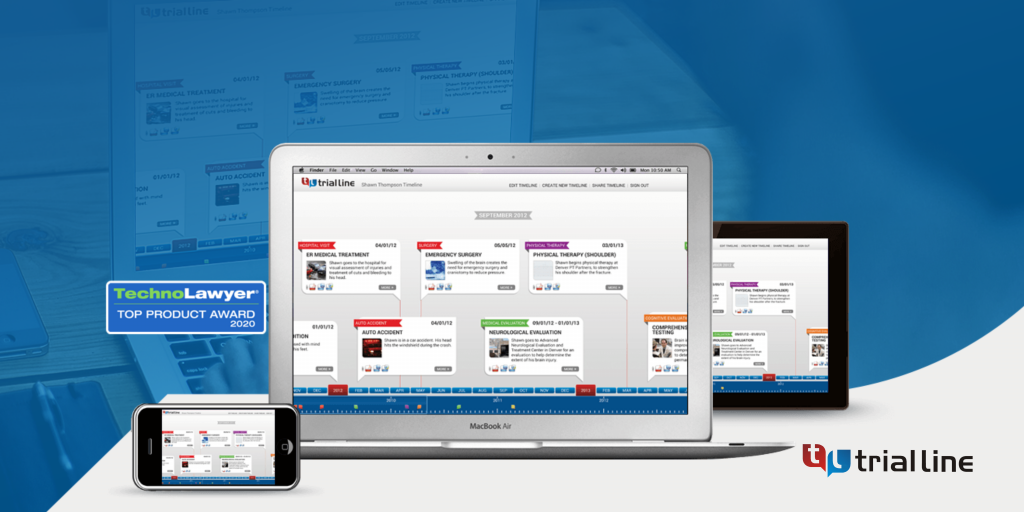
Specifically, platforms like TrialLine represent the next generation of case management technology designed specifically for attorneys’ needs. Unlike general project management tools that attorneys try to adapt for timeline purposes, specialized legal timeline software understands the unique requirements of legal practice.

TrialLine enables you to:

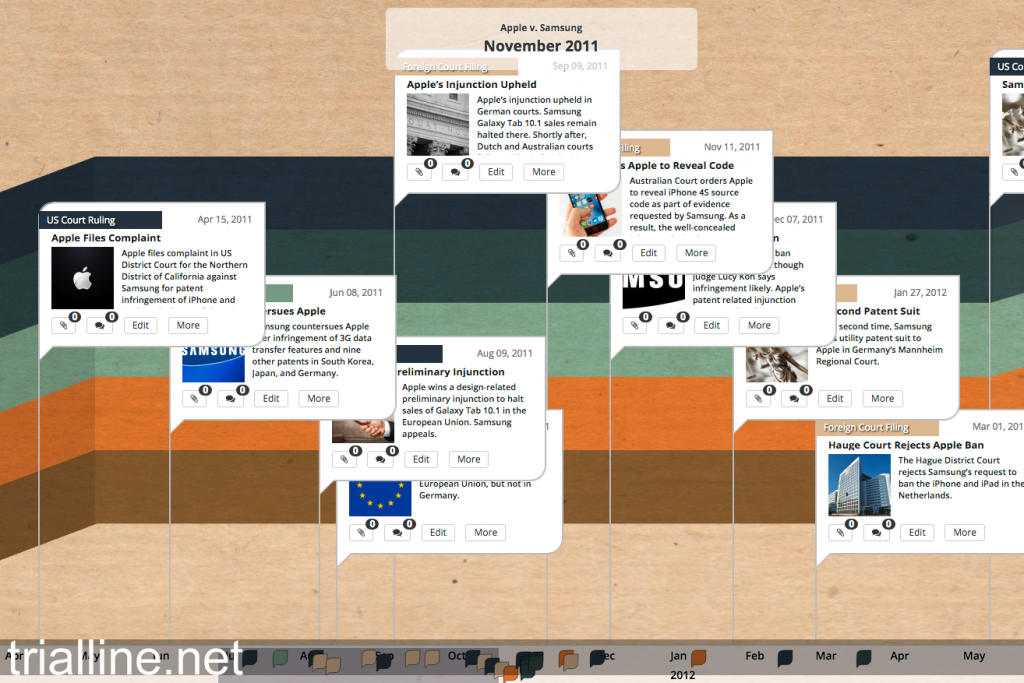
  • Build detailed, interactive timelines that present all relevant events in clear chronological sequence
  • Attach documents and evidence directly to timeline events, creating a unified case repository
  • Collaborate in real-time with team members across multiple locations
  • Access your timelines from any internet-connected device
  • Create compelling visual presentations for judges, juries, and clients
  • Quickly identify patterns, gaps, and inconsistencies in case facts
  • Filter and search complex timelines to locate specific information instantly

Most importantly, these capabilities compress what previously required hours of manual organization into minutes of efficient data input and presentation.

Real-World Application: Timeline Organization in Different Practice Areas

Let’s examine how effective timeline organization applies across various legal specialties.

Personal Injury and Product Liability Cases

In personal injury litigation, understanding the precise sequence of events leading to injury is critical. A well-organized timeline might show:

  • The date and time of the incident
  • Previous complaints or safety warnings
  • The defendant’s knowledge of the danger
  • The plaintiff’s actions immediately before injury
  • Emergency response and initial treatment
  • Subsequent medical interventions and their dates

By organizing this information visually and chronologically, you can more effectively argue that the defendant’s negligence directly caused the injury and demonstrate the extent of your client’s resulting damages.

Employment Litigation

Employment disputes often involve a series of events over months or years. Your timeline might document:

  • Initial employment and job responsibilities
  • Performance evaluations and feedback
  • Alleged discriminatory or retaliatory actions
  • Communication between employee and employer
  • Subsequent employment actions
  • Termination events and circumstances

A clear timeline helps establish whether a pattern of discrimination or retaliation exists, which is often more compelling than isolated incidents.

Commercial and Contract Disputes

Contract litigation frequently involves analyzing whether each party fulfilled their obligations according to the agreement timeline. Your timeline might show:

  • Contract formation and key dates
  • Performance obligations and deadlines
  • Actual performance events (or failures to perform)
  • Communications regarding performance issues
  • Breach events and their timing
  • Remedial actions taken by either party

When presented chronologically, these events either support your argument that the other party breached or defend your client’s performance.

Intellectual Property Cases

In IP litigation, understanding when various events occurred relative to patent dates, trademark registrations, or copyright ownership is essential. Your timeline might track:

  • Original creation or development dates
  • Patent application and issuance dates
  • The other party’s independent development timeline
  • Market entry and commercialization dates
  • Infringement activities and their timing
  • Notice and demand letters
  • Litigation milestones

A clear chronology helps establish priority, infringement, and damages calculations.

Frequently Asked Questions About Case Timeline Organization

How detailed should my timeline be?

The appropriate level of detail depends on your case complexity and audience. Generally, include events that:

  • Are factually significant to your legal claims or defenses
  • Establish temporal relationships relevant to your case narrative
  • Support your expert opinions or damage calculations
  • Demonstrate patterns or trends important to your case
  • Directly relate to the legal issues being litigated

Avoid cluttering your timeline with minor details that don’t advance your case strategy, as excessive information reduces clarity and makes it harder to identify truly important events.

When should I start building my timeline?

Ideally, begin developing your timeline early in the case lifecycle, not during trial preparation. As information emerges—through initial client consultations, document review, and discovery—capture timeline events systematically. This approach allows you to identify gaps and discovery needs earlier rather than later.

How do I handle disputed timeline events?

When opposing counsel disputes the timing or characterization of an event, your timeline should reflect this dispute. Consider maintaining:

  • Your client’s version of events
  • The opposing party’s version of events
  • Undisputed events that both parties agree occurred
  • Events supported by documentary evidence

This approach demonstrates the integrity of your case while making clear where factual disagreements exist.

Can I use timeline software in settlement negotiations?

Absolutely. In fact, visual timelines are often extremely effective in settlement discussions. Presenting your case narrative through a clear, professional timeline helps opposing counsel and insurance adjusters understand your case more effectively, potentially facilitating resolution. Moreover, visual presentations often prompt more productive discussions than text-based case summaries.

How should I present timelines in court?

When presenting timelines in court, ensure they:

  • Accurately reflect the evidence in the record
  • Don’t make legal arguments (stick to facts)
  • Use clear, legible formatting
  • Can be easily understood by judges or jurors
  • Don’t overwhelm audiences with excessive detail

Consider whether a single comprehensive timeline or multiple themed timelines better serves your presentation strategy.

Actionable Steps: Building Your Case Timeline Today

Ready to implement better timeline organization in your practice? Here’s your action plan:

Step One (This Week): Evaluate your current timeline management approach. Are you using spreadsheets, word documents, or relying on memory? Identify the specific inefficiencies and pain points in your current system.

Step Two (This Week): Gather the team members who work on your cases and discuss what better timeline organization would look like. Get their input on what features would make their work more efficient.

Step Three (Next Week): If you’re currently handling a complex case, start capturing timeline information systematically using your existing tools. Create a standardized entry format that your team can use consistently.

Step Four (Next Week): Research specialized legal timeline software designed specifically for attorneys’ needs. Evaluate whether tools like TrialLine could address the inefficiencies you identified in Step One.

Step Five (Following Week): If appropriate, implement a dedicated timeline management solution for your cases. Begin with one or two active cases to familiarize yourself with the platform before rolling it out across your practice.

Conclusion: Transforming Case Organization From Hours to Minutes

The ability to organize complex case timelines efficiently isn’t just a nice-to-have convenience—it’s increasingly a professional necessity. In an era where opposing counsel and jurors expect professional, organized case presentations, attorneys who maintain disorganized case information place themselves at a competitive disadvantage.

Moreover, the time investment required to organize cases effectively directly impacts your profitability. Hours spent on manual timeline creation and updating are hours unavailable for strategic case analysis, client service, or business development.

The good news: Modern legal technology has made it possible to organize even extremely complex timelines in minutes rather than hours. By implementing systematic data collection processes, standardizing your information architecture, and leveraging purpose-built legal software, you can transform timeline management from a time-consuming administrative burden into an efficient process that actually enhances your case strategy.

If you’re still organizing case timelines using spreadsheets, word documents, or memory, you’re working significantly harder than necessary. The investment in purpose-built timeline software pays for itself through improved efficiency and better case outcomes.

Ready to see how specialized timeline management can transform your case organization? Explore TrialLine’s cloud-based platform today and experience how modern legal technology can compress hours of timeline organization into minutes. Your future self—and your current cases—will thank you for the upgrade.

Start organizing your complex cases more efficiently. Your competitive advantage awaits. Visit TrialLine to discover how specialized legal timeline software can revolutionize your case management practice.

Turning Case Facts into a Persuasive Trial Narrative

Winning at trial is rarely about who has more facts. It’s about who tells the better story.

Judges and juries are not blank slates waiting to absorb raw data. They are human decision-makers who instinctively search for meaning, coherence, and motive. When case facts are presented as disconnected points–dates, documents, testimony excerpts–they compete for attention instead of reinforcing one another. A persuasive trial narrative transforms those same facts into a clear, compelling story that feels inevitable rather than assembled.

This process does not involve embellishment or advocacy masquerading as fiction. It is about structure. When facts are placed in the right order, framed around the right themes, and anchored to human behavior, they become memorable and credible. The difference between confusion and persuasion is often the difference between chronology and narrative.

Facts Are Not the Story–Structure Is

Most cases begin the same way: a pile of information. Emails, contracts, medical records, depositions, police reports, expert opinions. Each item is relevant, yet relevance alone does not create understanding.

Without structure, facts overwhelm. Jurors struggle to determine what matters, what caused what, and why any of it should lead to a particular outcome. The human brain processes stories far more efficiently than lists. Stories provide causation, context, and consequences. They answer three essential questions:

  1. What happened?
  2. Why did it happen?
  3. Why does it matter?

A trial narrative is the framework that allows those questions to be answered consistently from opening statement through closing argument.

Begin With the Ending in Mind

Every persuasive narrative starts with a destination. Before organizing facts, trial teams must be clear on the ultimate conclusion they want the jury to reach. Liability, intent, negligence, breach, damages–these are not just legal elements. They are narrative milestones.

Ask yourself: If a juror were explaining this case to a friend after trial, what would they say?
That imagined explanation should guide the narrative arc.

When the ending is clear, fact selection becomes strategic rather than exhaustive. Not every fact deserves equal attention. Some facts explain motivation. Others establish causation. Some exist primarily to support credibility. Understanding the purpose of each fact prevents clutter and keeps the story focused.

Identify the Core Theme

Every strong trial narrative has a theme–a simple, repeatable idea that explains the case in human terms. Themes are not slogans, but they should be clear enough to be summarized in a sentence.

Examples include:

  • “This was a preventable decision.”
  • “Shortcuts created long-term harm.”
  • “Warnings were ignored.”
  • “Promises were broken when accountability mattered most.”

The theme acts as a filter. Facts that reinforce it move to the foreground. Facts that distract from it are minimized or excluded. Throughout trial, jurors unconsciously test new information against the theme. When facts align with it, credibility increases.

Chronology Creates Comprehension

People understand events best when they are ordered in time. Chronology establishes cause and effect and allows jurors to track decisions as they unfold.

However, chronology alone is not enough. Simply listing events by date risks turning the narrative into a calendar rather than a story. The key is selective chronology–grouping events into meaningful phases and emphasizing turning points.

This is where a well-constructed legal timeline becomes invaluable, not as a visual aid alone, but as a thinking tool. When attorneys can see the sequence of events clearly, patterns emerge: delays, missed opportunities, repeated warnings, escalating risks. Those patterns are what transform chronology into persuasion.

Focus on Decisions, Not Just Events

Stories revolve around choices. Jurors are far more engaged by decisions than by occurrences.

Instead of saying, “The report was not reviewed,” say, “Despite receiving the report, the decision was made not to review it.”
Instead of, “The policy was not followed,” say, “The team chose speed over compliance.”

Framing facts around decisions introduces accountability without argument. It allows jurors to assess reasonableness on their own. Each decision becomes a moment where a different outcome was possible–and where responsibility becomes clear.

Humanize the Narrative

Even in highly technical cases, the narrative must remain human. Corporations act through people. Systems fail because individuals make choices within constraints. Plaintiffs experience harm in personal ways, not abstract categories.

Humanization does not mean emotional manipulation. It means grounding facts in lived experience:

  • What information did someone have at the time?
  • What pressures influenced their choice?
  • What consequences followed for real people?

When jurors can place themselves into the timeline–understanding what was known, what was uncertain, and what was at stake–the story gains credibility.

Integrate Evidence Seamlessly

Evidence should feel like a natural part of the story, not an interruption. Documents, testimony, and exhibits should appear at the moment they matter most in the narrative.

For example:

  • Introduce a critical email at the point when a warning was ignored.
  • Use deposition testimony when a witness’s credibility becomes relevant.
  • Present expert opinions after the factual foundation is established.

When evidence is aligned with narrative beats, jurors remember both the story and the proof supporting it.

Anticipate and Address Weaknesses

A persuasive narrative does not pretend weaknesses do not exist. Instead, it acknowledges them within the story.

When jurors encounter a damaging fact unexpectedly, it disrupts trust. When that same fact is framed early, explained honestly, and placed in context, its impact is reduced. Addressing weaknesses proactively signals confidence and transparency.

The narrative should answer not only why your version is correct, but why alternative interpretations fall short.

Maintain Consistency Across Trial Phases

A trial narrative is not limited to opening statements. It should remain consistent through witness examinations, evidentiary presentations, and closing arguments.

Each phase should reinforce the same structure:

  • The same key events
  • The same decision points
  • The same theme

Consistency builds familiarity. Familiarity builds trust. By the time of closing argument, jurors should feel like they already understand the story–they are simply being asked to confirm what they have seen all along.

Technology as a Narrative Ally

Modern trial teams increasingly rely on technology to manage complexity. When used correctly, digital tools do not replace storytelling; they enhance it.

Organizing facts, witnesses, and exhibits within a coherent structure allows attorneys to focus on persuasion rather than retrieval. When the story is clear internally, it becomes clearer externally.

The most effective tools are those that mirror how stories work–connecting people, events, and evidence in a way that reflects cause and effect rather than isolated data points.

Conclusion: Story Is Strategy

Turning case facts into a persuasive trial narrative is not an aesthetic exercise. It is a strategic one. Structure determines understanding. Understanding determines belief. Belief determines outcomes.

The strongest trial narratives do not rely on theatrics or oversimplification. They rely on clarity, consistency, and human logic. When facts are organized around decisions, themes, and consequences, jurors are not asked to work harder–they are guided naturally toward the conclusion the evidence supports. In the end, the story you tell is not separate from the case.
It is the case–seen clearly, understood fully, and remembered when it matters most.

Why Every Lawyer Needs an Evidence Presentation System

Courts depend on clear evidence to make fair decisions. However, traditional methods, such as printed documents and physical exhibits, often slow down proceedings and create confusion.

Lawyers who implement an evidence presentation system can present cases more clearly so that judges and juries can easily follow the facts.

These systems use digital tools to allow lawyers to present documents, images, videos, and other evidence in a structured way.

This article explains how they work, their benefits, and their role in modern trials.

Build persuasive arguments with clear timelines—use TrialLine!

What Is an Evidence Presentation System?

An evidence presentation system is a digital tool that transforms how lawyers present evidence in court.

These systems replace traditional paper documents with digital displays, allowing attorneys to deliver faster and more effective presentations. They can quickly display key documents, mark important details, and transition between various types of evidence without losing momentum.

Secure digital storage and remote access also ensure that legal teams can retrieve and manage case materials efficiently from any location.

Components of Evidence Presentation Systems

a lawyer in a courtroom

Modern presentation systems help lawyers present case materials clearly, ensuring smooth court proceedings:

  • Display screens and monitors – High-resolution screens at the judge’s bench, witness stand, and counsel tables provide clear visibility.
  • Document cameras – Display physical documents, handwritten notes, and exhibits in real time.
  • Digital media players – Support video and audio evidence, including surveillance footage and recorded statements. Meanwhile, a control panel is used to switch video sources.
  • Interactive touch screen monitors – Placing touch screen monitors at the witness and attorney tables enables real-time document annotation and highlighting of key details.
  • Wireless presentation equipment – Enable counsels to present materials without cables.

Make legal presentations smoother—get TrialLine now!

Benefits of Advanced Evidence Presentation Systems

Modern presentation systems improve how legal teams manage and present case materials. For example:

  • Enhanced clarity and persuasiveness Helps jurors and judges understand key points through digital markups, interactive displays, and clear visual aids.
  • Increased efficiency – Keeping all case materials in one place reduces courtroom delays. This allows attorneys to quickly access and present evidence without searching through stacks of paper.
  • Improved organization and accessibility – Stores case materials in a categorized and searchable format. It also eliminates the risk of misplaced evidence and ensures quick retrieval of key documents.
  • Enhanced security and confidentiality – Protects sensitive legal information with encryption and access controls. It further prevents unauthorized access, data loss, and tampering.

How Lawyers Can Adopt Evidence Presentation Systems

A lawyer presenting case results on a large screen in a courtroom

As courtroom technology continues to evolve, legal professionals need to stay updated on the best ways to incorporate digital tools into their practice.

Successfully implementing these systems requires:

Training and Adaptation

To maximize the benefits of an evidence presentation system, you should learn how to use it effectively.

Training sessions help attorneys navigate presentation tools, access case materials instantly, and highlight key evidence using interactive features. Mastery of these systems allows you to deliver more compelling arguments and keep jurors engaged.

Continuous practice and hands-on experience will help you stay comfortable with evolving technology and avoid technical setbacks during trials.

Cost Considerations

Upfront costs vary based on the system’s features, hardware, and trial software requirements.

While some solutions require huge investments, they reduce long-term expenses by cutting down on paper-based processes, minimizing trial delays, and improving efficiency.

Assess your budget and choose a system that meets your needs without unnecessary expenses.

A well-chosen evidence presentation system improves efficiency and strengthens a lawyer’s ability to present persuasive, well-organized arguments in court.

Improve Your Evidence Presentation With TrialLine

 TrialLine's legal timeline software

TrialLine transforms how attorneys manage and present cases by providing a structured, event-by-event timeline.

It allows you to create customized legal timelines that clearly communicate key case details. Events are displayed in an easy-to-follow format, offering a complete view of case progression.

With TrialLine, lawyers can organize large amounts of evidence, including documents, images, videos, and other multimedia files.

Everything is logically categorized, making case materials easy to retrieve and present.

Strengthen your legal presentations—schedule a demo with TrialLine now!

FAQs About Evidence Presentation System

What is evidence presentation?

Evidence presentation is the process of displaying and explaining case materials, such as documents, images, videos, and other supporting information, to support an argument or decision-making process. It is commonly used in legal settings, academic research, business reports, and scientific studies to provide clear, structured, and persuasive information.

How do you present evidence in a presentation?

Evidence should be presented in a logical and organized manner, using visuals, structured formats, and clear explanations. Key materials can be displayed through slides, charts, timelines, or multimedia to enhance understanding. The presenter should introduce the evidence, explain its relevance, and connect it to the overall argument. Engaging visuals and structured sequencing help keep the audience focused and make the information easier to process.

How should evidence be presented?

Evidence should be clear, relevant, and well-organized. It should be introduced with context, followed by an explanation of how it supports the argument. Visual aids such as charts, graphs, and digital displays help simplify complex details.

What is a presentation of evidence in a project?

In a project, evidence presentation involves organizing and displaying supporting data, research findings, or case studies to justify conclusions or recommendations. This can be done through reports, slideshows, or visual demonstrations. The evidence should be structured logically, cited properly, and clearly linked to the project’s objectives to strengthen its credibility and effectiveness.

How to Optimize Case Chronology for a Faster Appeal Timeline

Every appellant must follow strict time limits when filing appeals, submitting post-judgment motions, and responding to other party filings. Missing a deadline can cause delays or even lead to dismissal.

A well-organized case chronology helps track key dates, document necessary evidence, and strengthen legal arguments. Proper structuring ensures compliance with the court of appeals’ rules and increases the chances of a favorable ruling.

To maintain an efficient appeal timeline, legal professionals should use visual and technological tools to manage deadlines, track filings, and structure legal arguments effectively.

This guide explains how to manage the appeal period, the importance of a clear case timeline, and strategies for optimizing chronology.

Organize Case Chronology with Precision. Start Your Free Trial of TrialLine!

Breakdown of the Appeal Timeline

The appeal timeline follows a structured process that dictates when each step must be completed.

Understanding these deadlines is necessary for any appellant looking to challenge a court decision successfully. The appeal process typically involves filing a defendant’s notice, submitting legal briefs, and sometimes presenting oral arguments.

Each stage has a time limit, and failure to comply can result in case dismissal. The timeline varies depending on whether the case is in a district court, the court of appeals, or the Supreme Court.

Deadlines can be affected by factors such as newly discovered evidence, post-judgment motions, or a district judge granting an extension to the appeal time.

Certain motions listed in Rule 4(a)(4) also pause the appeal period. However, a motion for attorney’s fees does not extend the deadline unless the district court extends it under Rule 58(e). Filing such a motion will not delay other deadlines unless ordered by the judge.

Below are the appeal process stages and their respective time limits.

Initiating the Appeal Process

The appeal process begins when the appellant files a notice of appeal within the designated appeal period. The exact deadline depends on whether it is a civil case or a criminal case:

  • Civil case: The appeal must be filed within 30 days of the final judgment unless a statute provides otherwise.
  • Criminal case: The defendant’s notice must be filed within 14 days of the judgment or sentencing.

If post-trial or post-judgment motions are pending, such as a motion filed for a new trial or a request for reconsideration, the appeal period may be paused until those motions are resolved.

The court will issue an order disposing of these motions, which resets the deadline for an appeal filed afterward.

In some cases, if the district court extends the deadline due to excusable neglect or other valid reasons, additional time may be granted for the appeal to be filed. However, these extensions are limited and granted only in specific circumstances.

Written Briefs and Oral Arguments

Once the notice of appeal is submitted, both parties must file legal briefs outlining their arguments.

These documents form the backbone of the appeal process, presenting the legal basis for challenging or defending the court decision.

  • Opening brief (appellant): The appellant submits an opening brief explaining why the judgment should be reversed. This must be filed within a set time period, typically 40 days after the notice is filed.
  • Counter-brief (appellee): The other party, known as the appellee, has the opportunity to respond with a counter-brief, often within 30 days.
  • Reply brief (appellant): The appellant may then submit a reply brief, addressing the arguments presented by the other party.

Some appellate courts decide cases solely on these written arguments, while others allow oral arguments.

If scheduled, oral arguments are usually brief, with attorneys given 10–30 minutes to present their case before a panel of judges.

Reversal and Appellate Review

During the appellate review, the court of appeals examines the record from the district court to determine if legal errors were made.

Unlike a trial, no new evidence or witness testimony is introduced. Instead, the judges determine if mistakes in the proceeding impacted the judgment and require a change.

The possible outcomes of an appellate review include:

  • Reversal of judgment: If the court of appeals identifies a legal error that influenced the case, the judgment may be reversed.
  • Harmless error ruling: If the error was minor and did not affect the case outcome, the judgment constitutes a harmless mistake, and the original ruling will stand.
  • Further legal action: A reversal can result in a new trial, modification of the judgment, and another legal remedy ordered by the court of appeals.

However, not all cases qualify for a new appeal, especially if the errors were not raised in the initial trial.

For a reversal to occur, the appellant must show that the mistake had a direct and meaningful effect on the case outcome.

The Court’s Decision

After reviewing the record, the court of appeals issues a ruling that can:

  • Affirm: The court upholds the lower ruling with no changes.
  • Reverse: The decision is overturned, potentially leading to a new trial or a different outcome.
  • Remand: The case is sent back to the district court for further proceedings.

A party may file a petition for rehearing or seek Supreme Court review. An important exception applies if a party does not receive notice of the decision, in which case an extension may be granted.

To obtain review by the Supreme Court, a certiorari petition must be filed within 90 days of the appellate ruling or rehearing denial.

How a Court Case Timeline Strengthens Your Appeal Strategy

Courts rely on precise documentation, and without a properly maintained record, an appellant may struggle to prove procedural errors or justify the need for a new trial.

An effective case chronology allows attorneys to:

Support the Underlying Arguments

Case chronology strengthens the appeal by aligning legal arguments with documented events.

The court of appeals reviews if procedural and legal errors occurred, and an organized timeline can help demonstrate:

  • Procedural fairness: A clear sequence of filings and rulings helps show that all parties followed proper legal procedures.
  • Grounds for appeal: A timeline highlights events that justify an appeal filed based on judicial errors, misinterpretation of laws, or procedural missteps.
  • Timely motion: The court may reject an appeal if it is not filed within the designated appeal period. An accurate timeline makes sure all motions and responses comply with required time limits.

Without a well-documented case timeline, an appellant risks losing an appeal due to incomplete or disorganized arguments.

Sign Up for a Free 7-Day Trial of TrialLine—Build Better Timelines for Your Appeal!

Smoothly Integrate Legal Points

A strong appeal relies on linking events to relevant laws and procedural rules. By structuring a timeline, lawyers can show how specific errors in the trial impacted the outcome. For example:

  • Wrongly admitted evidence may have influenced the jury’s decision.
  • A motion filed for reconsideration might have been ignored, affecting the appeal period.
  • The district judge may have issued an incorrect ruling, which can be challenged.

By aligning events with legal arguments, attorneys make it easier for the court of appeals to understand why the judgment should be reversed or why a new trial is necessary.

Show Case Overview and Key Facts

An effective case chronology provides a clear, structured overview of key trial events, helping the court of appeals evaluate the appeal’s merit.

The more precise the timeline, the easier it is to demonstrate legal errors and justify the need for a new appeal. A clear timeline should include:

  • Key dates of the trial, motions, and judgment issuance.
  • Significant court decisions affecting the case outcome.
  • The filed appeal and subsequent legal steps taken.
  • Any newly discovered evidence that could impact the appeal process.

Presenting information in a structured format helps the court of appeals review the case record and identify relevant legal issues.

Best Ways to Have a Well-Structured Case Timeline

To present a strong case before the court of appeals, legal professionals must make sure every event is documented in a structured format.

The following methods can help create a well-structured case timeline, improving the clarity and effectiveness of an appeal.

Get Visual and Technological Tools

Modern legal timeline software provides a structured format for tracking appeal-related deadlines, documents, and court rulings.

These tools offer features such as annotations, document links, and chronological filtering, making case details easier to review.

Benefits of using timeline software in appeals:

  • Highlights key events visually: Judges can quickly review the most relevant case details.
  • Tracks separate documents and deadlines: Makes sure the judgment constitutes a final ruling before appeal deadlines are triggered.
  • Improve clarity: Organize motion filings, rulings, and appeals in a structured, easy-to-follow format.

Book a demo with TrialLine—No commitment, just smarter case management!

Use a Timeline Template

Using a timeline template provides a structured format for documenting case details.

A standardized format ensures that all relevant case events are presented in a logical sequence, making it easier for the court of appeals to follow the appeal.

Key elements of a timeline template include:

  • Case milestones: Adding important events such as the defendant’s notice, post-trial motions, and court rulings.
  • Filing deadlines: Making sure every appeal is filed within the designated time period to comply with appeal time regulations.
  • Legal arguments: Linking specific claims to relevant statutes, precedents, or procedural rules.
  • Supporting documents: Attaching necessary evidence, such as transcripts, rulings, and legal briefs, in an organized manner.

With a properly formatted case chronology, attorneys can provide a detailed and professional presentation of case facts, improving the clarity and effectiveness of an appeal.

Presenting a Clear Case History for Appellate Success With TrialLine

trialline

Managing an appeal timeline requires tracking court filings, deadlines, and procedural events. Without a clear system, important dates may be missed, weakening the appeal.

TrialLine is legal timeline software designed to provide a structured way to document motions filed, legal arguments, and procedural actions, ensuring compliance with time limits.

With TrialLine, attorneys can organize events, attach key evidence, track deadlines, and highlight procedural errors. The court of appeals relies on written records, making a clear timeline essential for a strong appeal.

Legal professionals can simplify documentation, enhance clarity, and improve their appeal strategy by using TrialLine.

Organize, Present, and Win. Start Using TrialLine for Free Today!

FAQs About Appeal Timeline

How long do most appeals take?

Most appeals take several months to over a year, though complex cases can take even longer. The timeline depends on factors such as the court’s schedule, the volume of pending cases, and whether procedural delays—such as requests for extensions or additional motions—are filed. Appeals in higher courts, such as federal appellate courts, often take longer than those in state courts. Expedited appeals may be available in some cases, such as those involving constitutional issues, child custody, or urgent matters.

What is the timeline for the appeal brief?

The timeline for an appeal brief varies by jurisdiction but generally follows this structure. The appellant’s brief (the initial argument) is usually due 30 to 60 days after filing the notice of appeal. The appellee’s response brief is typically due 30 days after receiving the appellant’s brief. The appellant may have the option to file a reply brief within 14 to 21 days after the appellee’s response. Courts may grant extensions if requested, but excessive delays can affect the overall appeal timeline. In some cases, oral arguments will follow after the briefs are submitted.

What is the time limit for an appeal?

The time limit to file an appeal depends on the type of case and jurisdiction. In federal civil cases, the notice of appeal must be filed within 30 days of the final judgment. In federal criminal cases, the deadline is typically 14 days after sentencing. The deadlines vary in state courts, with some allowing 10 to 60 days to file an appeal. Certain post-trial motions, such as a motion for reconsideration or a motion for a new trial, may sometimes extend the appeal deadline. Missing the deadline can result in losing the right to appeal unless there are exceptional circumstances.

How long should an appeal take?

The duration of an appeal typically ranges from six months to two years, depending on several factors. Appeals in state courts are often resolved faster than those in federal appellate courts. Cases involving multiple legal issues or constitutional challenges take longer. If oral arguments are required, the scheduling of these proceedings can extend the timeline. A higher volume of pending cases in the appellate court may lead to significant delays. Some courts offer expedited appeals for specific cases, such as election disputes or emergency legal matters, which can shorten the appeal process to a few months.

Disclaimer: The information provided in this article is for informational purposes only and does not constitute legal advice. Always consult with a qualified attorney or legal professional for advice regarding your specific situation.

Better Outcomes With TrialLine Legal Case Timeline Template

A well-structured case timeline template helps law firms win more cases and attract clients. A clear legal timeline presents significant events in chronological order, making complex cases easier for jurors and stakeholders to understand.

A strong legal timeline template organizes key dates, crucial facts, evidence, and documents, highlighting important witnesses and events for use in court. Every significant detail remains visible and accessible throughout the case. 

Customizable templates enable legal professionals to focus on the most pertinent information. These timeline templates clarify the presentation of legal matters, assisting associates, experts, and clients to better understand the context. Compared to handwritten notes or word processing tools, templates offer a clear visual overview of the case, enhancing arguments and supporting better outcomes.

Experience how TrialLine’s legal case timeline template can simplify case management. Try TrialLine free for 14 days today with no credit card required.

Choosing the Best Legal Case Timeline Software

case timeline

Selecting the right legal case timeline software is important for managing complex cases.

The best tools help legal professionals organize key facts, events, and documents for clear court presentations. However, many timeline templates fall short, especially those that resemble basic PowerPoint programs.

The Limitations of Generic Project Timeline Tools

Basic project timeline tools may work for simple cases but lack the features needed for legal matters. Many force all information into one rigid format, which limits how attorneys highlight key dates and evidence. Some rely on outdated technologies like Adobe Flash, which can create compatibility issues, especially on iPads, and lose interactive features when integrated with PowerPoint.

Such a tool fails to support advanced presentation needs and often comes short.

Why PowerPoint and Keynote May Not Be Enough

While PowerPoint and Keynote are common for project timelines, they lack features essential for handling complex cases. These tools do not support interactive timelines or easy updates. IF you manage multiple significant events, you need software that allows you to:

  • Adjust key dates as new information emerges
  • Highlight key facts and evidence clearly
  • Present timelines interactively during court sessions

What Attorneys Should Look For

The best legal timeline template should provide flexibility and ease of use. Key features include:

  • Customizable events templates to fit case needs
  • Interactive presentations for jurors and clients
  • Seamless integration with existing legal tools
  • Device compatibility for access across multiple platforms

Specialized legal case timeline software gives attorneys the ability to present key facts, significant events, and documents in a clear chronological order. Unlike general project timeline tools, these solutions handle the complexity of legal cases by supporting interactive, dynamic timelines that adjust as cases progress.

What to Look for in a Trial Timeline Template

While not every attorney relies on visuals, jurors usually do. A clear, visually engaging legal timeline template can make the difference between winning and losing a case. Judges and jurors retain more information when visuals support oral arguments.

A well-designed case timeline template presents key facts in a way that is easy to follow. It links important events, evidence, and testimony, reinforcing the main points throughout the presentation.

Given the large amount of information attorneys manage during a trial, the right legal case timeline software provides essential support. It simplifies complex details, organizes key dates, and keeps everything accessible during the most challenging parts of litigation.

Build Timelines, Win Cases. Try TrialLine for Free for 14 Days!

Why TrialLine Is the Best Choice for Legal Case Timelines

trialline

TrialLine is cloud-based legal case timeline software designed for law firms that need efficient, easy-to-use legal chronologies. It allows users to organize and share case events, key facts, and documents with staff, experts, juries, opposing counsel, and other attorneys.

Completely web-based, TrialLine works on any device with an internet connection. Access and share timelines anytime, anywhere.

Sign up now and try TrialLine FREE for 14 days. Create timelines that win cases.

FAQs About Case Timeline Template

How can I create a timeline for a case?

List all key facts, events, and documents in chronological order. Use a case timeline template to organize these details. Tools like TrialLine help create interactive timelines for easy sharing and presentation.

Is there a timeline template in Word?

Yes. Microsoft Word offers basic timeline templates under the “Insert” tab using SmartArt graphics. These work for simple timelines but lack the features needed for complex legal cases.

Is there a timeline template in Excel?

Yes. Excel includes project timeline templates that can track key dates and events. However, these templates are better suited for general projects and may not handle legal matters with multiple significant events.

Is there a timeline template in Google Docs?

Google Docs does not have built-in timeline templates, but you can create timelines using tables or insert diagrams via Google Drawings. For detailed legal cases, specialized tools like TrialLine provide more advanced features.