Criminal Case Timeline for a Felony Crime

Felony cases follow a legal process that determines how charges move through the court system. Unlike misdemeanor cases, felony cases involve serious crimes that can lead to long-term consequences, including prison sentences, fines, and a permanent criminal record.

The timeline for a felony case depends on several factors, including the severity of the crime, legal motions, and plea negotiations. Continue reading “Criminal Case Timeline for a Felony Crime”

Why Every Lawyer Needs an Evidence Presentation System

Courts depend on clear evidence to make fair decisions. However, traditional methods, such as printed documents and physical exhibits, often slow down proceedings and create confusion.

Lawyers who implement an evidence presentation system can present cases more clearly so that judges and juries can easily follow the facts.

These systems use digital tools to allow lawyers to present documents, images, videos, and other evidence in a structured way.

This article explains how they work, their benefits, and their role in modern trials.

Build persuasive arguments with clear timelines—use TrialLine!

What Is an Evidence Presentation System?

An evidence presentation system is a digital tool that transforms how lawyers present evidence in court.

These systems replace traditional paper documents with digital displays, allowing attorneys to deliver faster and more effective presentations. They can quickly display key documents, mark important details, and transition between various types of evidence without losing momentum.

Secure digital storage and remote access also ensure that legal teams can retrieve and manage case materials efficiently from any location.

Components of Evidence Presentation Systems

a lawyer in a courtroom

Modern presentation systems help lawyers present case materials clearly, ensuring smooth court proceedings:

  • Display screens and monitors – High-resolution screens at the judge’s bench, witness stand, and counsel tables provide clear visibility.
  • Document cameras – Display physical documents, handwritten notes, and exhibits in real time.
  • Digital media players – Support video and audio evidence, including surveillance footage and recorded statements. Meanwhile, a control panel is used to switch video sources.
  • Interactive touch screen monitors – Placing touch screen monitors at the witness and attorney tables enables real-time document annotation and highlighting of key details.
  • Wireless presentation equipment – Enable counsels to present materials without cables.

Make legal presentations smoother—get TrialLine now!

Benefits of Advanced Evidence Presentation Systems

Modern presentation systems improve how legal teams manage and present case materials. For example:

  • Enhanced clarity and persuasiveness Helps jurors and judges understand key points through digital markups, interactive displays, and clear visual aids.
  • Increased efficiency – Keeping all case materials in one place reduces courtroom delays. This allows attorneys to quickly access and present evidence without searching through stacks of paper.
  • Improved organization and accessibility – Stores case materials in a categorized and searchable format. It also eliminates the risk of misplaced evidence and ensures quick retrieval of key documents.
  • Enhanced security and confidentiality – Protects sensitive legal information with encryption and access controls. It further prevents unauthorized access, data loss, and tampering.

How Lawyers Can Adopt Evidence Presentation Systems

A lawyer presenting case results on a large screen in a courtroom

As courtroom technology continues to evolve, legal professionals need to stay updated on the best ways to incorporate digital tools into their practice.

Successfully implementing these systems requires:

Training and Adaptation

To maximize the benefits of an evidence presentation system, you should learn how to use it effectively.

Training sessions help attorneys navigate presentation tools, access case materials instantly, and highlight key evidence using interactive features. Mastery of these systems allows you to deliver more compelling arguments and keep jurors engaged.

Continuous practice and hands-on experience will help you stay comfortable with evolving technology and avoid technical setbacks during trials.

Cost Considerations

Upfront costs vary based on the system’s features, hardware, and trial software requirements.

While some solutions require huge investments, they reduce long-term expenses by cutting down on paper-based processes, minimizing trial delays, and improving efficiency.

Assess your budget and choose a system that meets your needs without unnecessary expenses.

A well-chosen evidence presentation system improves efficiency and strengthens a lawyer’s ability to present persuasive, well-organized arguments in court.

Improve Your Evidence Presentation With TrialLine

 TrialLine's legal timeline software

TrialLine transforms how attorneys manage and present cases by providing a structured, event-by-event timeline.

It allows you to create customized legal timelines that clearly communicate key case details. Events are displayed in an easy-to-follow format, offering a complete view of case progression.

With TrialLine, lawyers can organize large amounts of evidence, including documents, images, videos, and other multimedia files.

Everything is logically categorized, making case materials easy to retrieve and present.

Strengthen your legal presentations—schedule a demo with TrialLine now!

FAQs About Evidence Presentation System

What is evidence presentation?

Evidence presentation is the process of displaying and explaining case materials, such as documents, images, videos, and other supporting information, to support an argument or decision-making process. It is commonly used in legal settings, academic research, business reports, and scientific studies to provide clear, structured, and persuasive information.

How do you present evidence in a presentation?

Evidence should be presented in a logical and organized manner, using visuals, structured formats, and clear explanations. Key materials can be displayed through slides, charts, timelines, or multimedia to enhance understanding. The presenter should introduce the evidence, explain its relevance, and connect it to the overall argument. Engaging visuals and structured sequencing help keep the audience focused and make the information easier to process.

How should evidence be presented?

Evidence should be clear, relevant, and well-organized. It should be introduced with context, followed by an explanation of how it supports the argument. Visual aids such as charts, graphs, and digital displays help simplify complex details.

What is a presentation of evidence in a project?

In a project, evidence presentation involves organizing and displaying supporting data, research findings, or case studies to justify conclusions or recommendations. This can be done through reports, slideshows, or visual demonstrations. The evidence should be structured logically, cited properly, and clearly linked to the project’s objectives to strengthen its credibility and effectiveness.

How to Optimize Case Chronology for a Faster Appeal Timeline

Every appellant must follow strict time limits when filing appeals, submitting post-judgment motions, and responding to other party filings. Missing a deadline can cause delays or even lead to dismissal.

A well-organized case chronology helps track key dates, document necessary evidence, and strengthen legal arguments. Proper structuring ensures compliance with the court of appeals’ rules and increases the chances of a favorable ruling.

To maintain an efficient appeal timeline, legal professionals should use visual and technological tools to manage deadlines, track filings, and structure legal arguments effectively.

This guide explains how to manage the appeal period, the importance of a clear case timeline, and strategies for optimizing chronology.

Organize Case Chronology with Precision. Start Your Free Trial of TrialLine!

Breakdown of the Appeal Timeline

The appeal timeline follows a structured process that dictates when each step must be completed.

Understanding these deadlines is necessary for any appellant looking to challenge a court decision successfully. The appeal process typically involves filing a defendant’s notice, submitting legal briefs, and sometimes presenting oral arguments.

Each stage has a time limit, and failure to comply can result in case dismissal. The timeline varies depending on whether the case is in a district court, the court of appeals, or the Supreme Court.

Deadlines can be affected by factors such as newly discovered evidence, post-judgment motions, or a district judge granting an extension to the appeal time.

Certain motions listed in Rule 4(a)(4) also pause the appeal period. However, a motion for attorney’s fees does not extend the deadline unless the district court extends it under Rule 58(e). Filing such a motion will not delay other deadlines unless ordered by the judge.

Below are the appeal process stages and their respective time limits.

Initiating the Appeal Process

The appeal process begins when the appellant files a notice of appeal within the designated appeal period. The exact deadline depends on whether it is a civil case or a criminal case:

  • Civil case: The appeal must be filed within 30 days of the final judgment unless a statute provides otherwise.
  • Criminal case: The defendant’s notice must be filed within 14 days of the judgment or sentencing.

If post-trial or post-judgment motions are pending, such as a motion filed for a new trial or a request for reconsideration, the appeal period may be paused until those motions are resolved.

The court will issue an order disposing of these motions, which resets the deadline for an appeal filed afterward.

In some cases, if the district court extends the deadline due to excusable neglect or other valid reasons, additional time may be granted for the appeal to be filed. However, these extensions are limited and granted only in specific circumstances.

Written Briefs and Oral Arguments

Once the notice of appeal is submitted, both parties must file legal briefs outlining their arguments.

These documents form the backbone of the appeal process, presenting the legal basis for challenging or defending the court decision.

  • Opening brief (appellant): The appellant submits an opening brief explaining why the judgment should be reversed. This must be filed within a set time period, typically 40 days after the notice is filed.
  • Counter-brief (appellee): The other party, known as the appellee, has the opportunity to respond with a counter-brief, often within 30 days.
  • Reply brief (appellant): The appellant may then submit a reply brief, addressing the arguments presented by the other party.

Some appellate courts decide cases solely on these written arguments, while others allow oral arguments.

If scheduled, oral arguments are usually brief, with attorneys given 10–30 minutes to present their case before a panel of judges.

Reversal and Appellate Review

During the appellate review, the court of appeals examines the record from the district court to determine if legal errors were made.

Unlike a trial, no new evidence or witness testimony is introduced. Instead, the judges determine if mistakes in the proceeding impacted the judgment and require a change.

The possible outcomes of an appellate review include:

  • Reversal of judgment: If the court of appeals identifies a legal error that influenced the case, the judgment may be reversed.
  • Harmless error ruling: If the error was minor and did not affect the case outcome, the judgment constitutes a harmless mistake, and the original ruling will stand.
  • Further legal action: A reversal can result in a new trial, modification of the judgment, and another legal remedy ordered by the court of appeals.

However, not all cases qualify for a new appeal, especially if the errors were not raised in the initial trial.

For a reversal to occur, the appellant must show that the mistake had a direct and meaningful effect on the case outcome.

The Court’s Decision

After reviewing the record, the court of appeals issues a ruling that can:

  • Affirm: The court upholds the lower ruling with no changes.
  • Reverse: The decision is overturned, potentially leading to a new trial or a different outcome.
  • Remand: The case is sent back to the district court for further proceedings.

A party may file a petition for rehearing or seek Supreme Court review. An important exception applies if a party does not receive notice of the decision, in which case an extension may be granted.

To obtain review by the Supreme Court, a certiorari petition must be filed within 90 days of the appellate ruling or rehearing denial.

How a Court Case Timeline Strengthens Your Appeal Strategy

Courts rely on precise documentation, and without a properly maintained record, an appellant may struggle to prove procedural errors or justify the need for a new trial.

An effective case chronology allows attorneys to:

Support the Underlying Arguments

Case chronology strengthens the appeal by aligning legal arguments with documented events.

The court of appeals reviews if procedural and legal errors occurred, and an organized timeline can help demonstrate:

  • Procedural fairness: A clear sequence of filings and rulings helps show that all parties followed proper legal procedures.
  • Grounds for appeal: A timeline highlights events that justify an appeal filed based on judicial errors, misinterpretation of laws, or procedural missteps.
  • Timely motion: The court may reject an appeal if it is not filed within the designated appeal period. An accurate timeline makes sure all motions and responses comply with required time limits.

Without a well-documented case timeline, an appellant risks losing an appeal due to incomplete or disorganized arguments.

Sign Up for a Free 7-Day Trial of TrialLine—Build Better Timelines for Your Appeal!

Smoothly Integrate Legal Points

A strong appeal relies on linking events to relevant laws and procedural rules. By structuring a timeline, lawyers can show how specific errors in the trial impacted the outcome. For example:

  • Wrongly admitted evidence may have influenced the jury’s decision.
  • A motion filed for reconsideration might have been ignored, affecting the appeal period.
  • The district judge may have issued an incorrect ruling, which can be challenged.

By aligning events with legal arguments, attorneys make it easier for the court of appeals to understand why the judgment should be reversed or why a new trial is necessary.

Show Case Overview and Key Facts

An effective case chronology provides a clear, structured overview of key trial events, helping the court of appeals evaluate the appeal’s merit.

The more precise the timeline, the easier it is to demonstrate legal errors and justify the need for a new appeal. A clear timeline should include:

  • Key dates of the trial, motions, and judgment issuance.
  • Significant court decisions affecting the case outcome.
  • The filed appeal and subsequent legal steps taken.
  • Any newly discovered evidence that could impact the appeal process.

Presenting information in a structured format helps the court of appeals review the case record and identify relevant legal issues.

Best Ways to Have a Well-Structured Case Timeline

To present a strong case before the court of appeals, legal professionals must make sure every event is documented in a structured format.

The following methods can help create a well-structured case timeline, improving the clarity and effectiveness of an appeal.

Get Visual and Technological Tools

Modern legal timeline software provides a structured format for tracking appeal-related deadlines, documents, and court rulings.

These tools offer features such as annotations, document links, and chronological filtering, making case details easier to review.

Benefits of using timeline software in appeals:

  • Highlights key events visually: Judges can quickly review the most relevant case details.
  • Tracks separate documents and deadlines: Makes sure the judgment constitutes a final ruling before appeal deadlines are triggered.
  • Improve clarity: Organize motion filings, rulings, and appeals in a structured, easy-to-follow format.

Book a demo with TrialLine—No commitment, just smarter case management!

Use a Timeline Template

Using a timeline template provides a structured format for documenting case details.

A standardized format ensures that all relevant case events are presented in a logical sequence, making it easier for the court of appeals to follow the appeal.

Key elements of a timeline template include:

  • Case milestones: Adding important events such as the defendant’s notice, post-trial motions, and court rulings.
  • Filing deadlines: Making sure every appeal is filed within the designated time period to comply with appeal time regulations.
  • Legal arguments: Linking specific claims to relevant statutes, precedents, or procedural rules.
  • Supporting documents: Attaching necessary evidence, such as transcripts, rulings, and legal briefs, in an organized manner.

With a properly formatted case chronology, attorneys can provide a detailed and professional presentation of case facts, improving the clarity and effectiveness of an appeal.

Presenting a Clear Case History for Appellate Success With TrialLine

trialline

Managing an appeal timeline requires tracking court filings, deadlines, and procedural events. Without a clear system, important dates may be missed, weakening the appeal.

TrialLine is legal timeline software designed to provide a structured way to document motions filed, legal arguments, and procedural actions, ensuring compliance with time limits.

With TrialLine, attorneys can organize events, attach key evidence, track deadlines, and highlight procedural errors. The court of appeals relies on written records, making a clear timeline essential for a strong appeal.

Legal professionals can simplify documentation, enhance clarity, and improve their appeal strategy by using TrialLine.

Organize, Present, and Win. Start Using TrialLine for Free Today!

FAQs About Appeal Timeline

How long do most appeals take?

Most appeals take several months to over a year, though complex cases can take even longer. The timeline depends on factors such as the court’s schedule, the volume of pending cases, and whether procedural delays—such as requests for extensions or additional motions—are filed. Appeals in higher courts, such as federal appellate courts, often take longer than those in state courts. Expedited appeals may be available in some cases, such as those involving constitutional issues, child custody, or urgent matters.

What is the timeline for the appeal brief?

The timeline for an appeal brief varies by jurisdiction but generally follows this structure. The appellant’s brief (the initial argument) is usually due 30 to 60 days after filing the notice of appeal. The appellee’s response brief is typically due 30 days after receiving the appellant’s brief. The appellant may have the option to file a reply brief within 14 to 21 days after the appellee’s response. Courts may grant extensions if requested, but excessive delays can affect the overall appeal timeline. In some cases, oral arguments will follow after the briefs are submitted.

What is the time limit for an appeal?

The time limit to file an appeal depends on the type of case and jurisdiction. In federal civil cases, the notice of appeal must be filed within 30 days of the final judgment. In federal criminal cases, the deadline is typically 14 days after sentencing. The deadlines vary in state courts, with some allowing 10 to 60 days to file an appeal. Certain post-trial motions, such as a motion for reconsideration or a motion for a new trial, may sometimes extend the appeal deadline. Missing the deadline can result in losing the right to appeal unless there are exceptional circumstances.

How long should an appeal take?

The duration of an appeal typically ranges from six months to two years, depending on several factors. Appeals in state courts are often resolved faster than those in federal appellate courts. Cases involving multiple legal issues or constitutional challenges take longer. If oral arguments are required, the scheduling of these proceedings can extend the timeline. A higher volume of pending cases in the appellate court may lead to significant delays. Some courts offer expedited appeals for specific cases, such as election disputes or emergency legal matters, which can shorten the appeal process to a few months.

Disclaimer: The information provided in this article is for informational purposes only and does not constitute legal advice. Always consult with a qualified attorney or legal professional for advice regarding your specific situation.

Best Tech Tools for Lawyers: Solutions for Modern Legal Work

With the evolving process and work environments, technological tools are becoming increasingly prevalent. Like other core industries, the legal field is adapting to the increasing digital transformation. More lawyers are embracing tools to simplify processes such as research and billing.

Driven by the growing demand for work-from-home setups and automation, lawyers and law firms will have to adapt to these changes with the right tech tools.

In this blog, we’ll discuss the best tools for lawyers, drawing from industry reports and trends observed in the legal profession. This way, you can make informed decisions on what your firm can adopt to enhance its efficiency.

Don’t let disorganized case files hold your firm back. Try TrialLine today and streamline your legal work!

What Are Tech Tools for Lawyers?

Technology is transforming the legal profession, allowing law firms to manage legal practice more efficiently. Outdated methods create delays, security risks, and disorganization. Modern legal software helps streamline law firm operations, improve task management, and enhance client intake and communication.

Key tools include case management software for organizing cases, legal research tools for accessing case law, and document automation for handling legal documents. Project management software helps coordinate tasks, while AI-powered tools assist with contract analysis and document review. Time tracking and accounting software support billing accuracy and financial oversight.

Using the best tools for lawyers makes legal work more efficient, improves legal services, and strengthens case preparation. As the legal practice continues evolving, adopting AI-powered tools and practice management software is key to staying competitive.

Recommended Reading

How Legal Timeline Tools Help Your Case

Best Lawyer Tech Tools

Law firms use technology to improve efficiency, security, and client service. The right legal software helps manage legal documents, track billable hours, and communicate effectively with clients. Below are the best tools for lawyers that support different aspects of legal practice, from case management to legal research and document automation.

Legal Timeline Software

Organizing case details in a clear timeline improves case preparation and legal strategy. Legal timeline software helps lawyers visualize key case events, track evidence, and prepare for court.

For instance, TrialLine is a legal timeline tool that organizes legal documents and evidence chronologically. It helps with case preparation for court appearances, mediation, and negotiations.

AI Tools for Lawyers

AI-powered solutions are revolutionizing legal work by automating tasks such as research, document review, and contract analysis.

In particular, AI-powered legal assistants help analyze case law and predict case outcomes. They can help with contract analysis, automate document review, and identify legal risks.

Cloud Storage for Legal Documents

Lawyers need secure document management software to store and access files from any location. Cloud storage enhances data security and allows law firms to work remotely.

DropSend is an example of a secure cloud storage solution with encryption to protect client data. You can use it to set expiration dates, control downloads, and apply password protection for sensitive files.

Legal Research Tools

Fast and accurate research is essential in the legal industry. Modern platforms provide access to vast legal databases, statutes, and precedents.

Platforms like Westlaw and LexisNexis provide access to comprehensive legal databases, including case law, statutes, and legal journals.

Document Management and Automation

document management vector image

Paperwork is an integral part of the law, but handling documents doesn’t have to be as tedious or time-consuming as it once was. Legal document automation tools simplify document creation by using existing information, such as key dates or contact details, to populate forms.

iManage and Clio are among the top-rated tools for document management for legal professionals.

E-Discovery Tools

Today, the majority of discoveries are electronic or e-discoveries. E-discovery tools are specialized software solutions designed to help legal professionals identify, collect, review, and produce electronically stored information (ESI) during the discovery phase of litigation.

Key functions of e-discovery tools include data collection, processing, review, production, and preservation. A few examples of e-discovery tools are Relativity, Everlaw, and Logikcull.

Time Tracking and Billing Software

Accurate time tracking and billing are crucial for law firm profitability. However, manually monitoring time and handling billing can reduce productivity.

Billing and time-tracking tools help legal professionals accurately record the time spent on various tasks and generate invoices for clients. These tools improve practice management so that lawyers are properly compensated for their work.

You can use these tools to track billable hours for specific tasks or cases and create detailed invoices based on recorded time entries. Additionally, they record costs incurred during a case, such as court fees, travel expenses, and other billable items. 

Practice Management Software

people using practice management software vector image

Legal practice management software is essential for law firms, particularly solo practitioners.

This software is a comprehensive solution designed to help law firms manage their daily operations more efficiently. It integrates various functions to streamline tasks and increase productivity. Some practice management software for lawyers include Clio, MyCase, and Practice Panther.

Virtual Meeting Tools

Communication and collaboration are pivotal for a lawyer’s achievements, yet face-to-face interactions aren’t always feasible or preferred. Lawyers often find themselves needing to collaborate with colleagues, clients, and experts situated in diverse geographical areas.

Virtual meeting tools facilitate smooth communication and collaboration. Furthermore, virtual meetings enable law firms to uphold client relationships, even in the absence of in-person meetings.

Legal Analytics Tools

Legal analytics tools are software solutions that use data analysis techniques to offer insights and predictions across different facets of the legal field. These tools forecast the probable outcome of legal cases by considering various factors. They also pinpoint pertinent case laws, statutes, and legal articles relevant to specific legal matters.

Client Portals

Client portals allow lawyers to exchange messages and documents with clients securely. They grant clients access to information so they stay informed about their cases with minimal manual updates from lawyers.

You can communicate and share sensitive information, including legal documents, without the threat of interception or unauthorized access. Clients can log in to the portal conveniently from any location with internet access. In turn, they can review case updates, exchange documents, and communicate with you even beyond regular business hours. 

Selecting appropriate tools can significantly impact the growth of your law firm. Embracing legal tech tools and innovations can enhance efficiency, profitability, and client focus. 

Despite the abundance of available tools, it is not necessary to adopt them all simultaneously. Instead, carefully evaluate each tool and begin with the essentials. Gradually integrate additional tools strategically to establish a tech stack that optimizes firm operations.

Top Legal Timeline Software for Lawyers to Use in 2025

Legal timeline software is one of the best tools for lawyers, offering a clear, visual sequence of events that enhances case preparation, improves client communications, and strengthens legal strategies.

More than just date tracking, legal timeline software integrates with case management software, supports document automation, and helps attorneys analyze case facts with precision. It ensures that law firms can organize evidence efficiently, present cases effectively in court, and manage law firm operations with greater accuracy.

Below are the top legal timeline software solutions for 2025, designed to help lawyers, litigators, and legal professionals build stronger cases.

1. TrialLine

trialline

TrialLine is cloud-based legal timeline software built specifically for law firms that require a structured way to organize case facts, evidence, and witness testimony. Unlike generic timeline tools, TrialLine is designed for litigation-focused legal professionals, providing interactive visual timelines that connect case details in a way that’s easy to present in court.

Most timeline tools offer basic event plotting, but TrialLine integrates deeper case management features that help attorneys prepare for court appearances, depositions, and mediations. It allows lawyers to attach legal documents, videos, photos, and court filings directly to specific timeline entries, ensuring that all case-related data remains well-organized and easy to access.

Key Features of TrialLine:

  • Chronological case organization – TrialLine structures legal cases into a clear timeline format, making it easier to identify patterns and build legal arguments.
  • Document and evidence management – Attach case files, PDFs, photos, and videos directly to timeline entries for efficient document management.
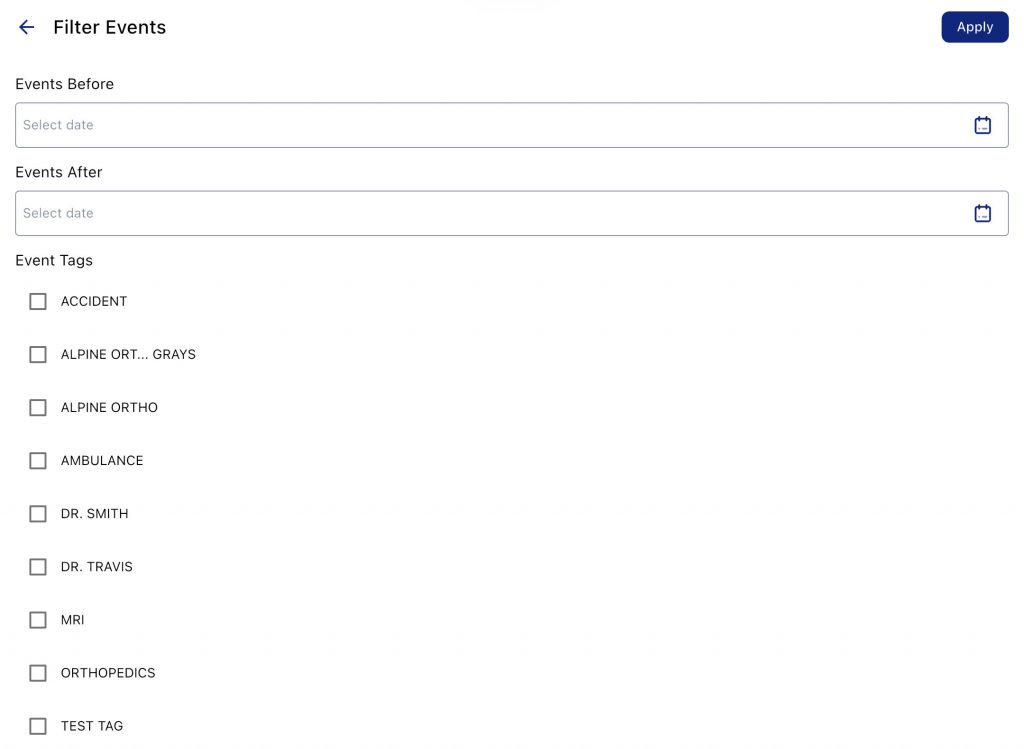
  • Advanced filtering and categorization – Sort and filter timeline events by issue type, witness, or relevance, allowing attorneys to focus on specific case details.
  • Interactive courtroom presentations – Unlike static timelines, TrialLine allows users to click through case events in real time, providing a dynamic and engaging trial presentation.
  • Team collaboration & sharing – Share case timelines with legal teams, clients, and experts to keep everyone aligned.
  • Cloud-based access – Securely log in from any device, making it ideal for remote legal teams and multi-state litigation.

Pricing Plans:

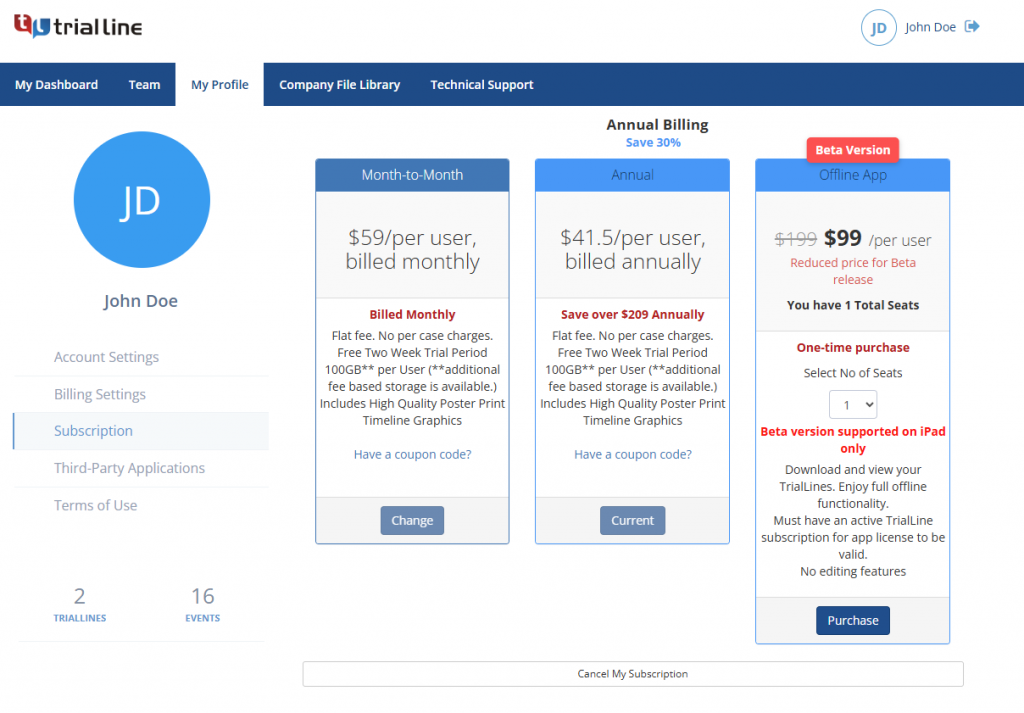
  • Month-to-month plan – $59 per month per user, Flexible subscription with no long-term commitment, full access to the online version, and 100GB cloud storage for legal documents.
  • Annual plan – $41 per month per user (billed annually at $499, saving $209 per year). Best value plan offering full TrialLine features at a discounted rate, including document automation, timeline visualization, and case collaboration tools.

Ready to improve your case strategy? Try TrialLine today and transform the way you manage legal timelines!

2. CaseFleet

casefleet

Source: CaseFleet.com

CaseFleet is cloud-based legal case management software for organizing case facts and managing documents. It lets you create detailed case chronologies by linking facts, witnesses, dates, and evidence in a cohesive timeline.

The platform’s document reviewer feature allows for the attachment of supporting materials directly to specific facts for easier evidence management. Users can search and filter facts by various criteria, such as date, contact, issue, or source, and can edit information inline for accuracy.

Key Features:

  • Fact and issue management – Organize case details by linking facts, issues, witnesses, and evidence into a cohesive timeline.
  • Document review – Attach and review supporting materials directly within the platform, streamlining evidence management.
  • Full-text search – Search within complex legal documents to locate relevant information.
  • Task management – Assign and track tasks to ensure timely completion of case-related activities.

Pricing:

  • Starter – $40/user/month with chronology-building tools and evidence citations
  • Standard – $100/user/month with full-text search and deposition designations
  • Enterprise – Custom pricing

3. TimeMap

timemap

Source: Lexisnexis.com

TimeMap is a timeline graphic tool developed by LexisNexis for converting case facts into high-quality visual timelines for court proceedings. The platform offers over 30 pre-built templates, customizable elements, and integration with other LexisNexis products like CaseMap.

Key Features:

  • Fact boxes – Create flags denoting events in the case chronology, automatically positioned on the timeline based on their dates.
  • Multiple output formats – Display timelines in various formats, including PowerPoint presentations, printed copies, or digital images (JPEG, GIF, BMP, or metafile) for diverse presentation requirements.
  • Full-screen mode: Present timelines directly from TimeMap in full-screen mode, facilitating effective display during meetings or court proceedings.

Pricing Plans:

  • Pricing for CaseMap is not publicly available on LexisNexis.

4. SmartDraw

smartdraw

Source: Smartdraw.com

SmartDraw is not exclusively a legal timeline tool, but many law firms use it to create basic case timelines for court presentations and legal arguments. It’s more of a general-purpose timeline and diagram tool, making it a budget-friendly alternative for firms that don’t need advanced case management capabilities.

Key Features:

  • Drag-and-drop timeline builder – Create legal timelines with minimal effort.
  • Integration with Microsoft Office and Google Drive – Export files into Word, PowerPoint, and other formats.
  • Basic collaboration tools – Share timelines with colleagues and clients.

Pricing Plans:

  • Individual plan: $9.95 per month.
  • Team plan: $8.25 per user per month (minimum of three users). Comes with document retention and control
  • Site plan: $5 per user per month. With Everything in the Team plan, plus multiple shared folders

Support Your Casework With Legal Timeline Software

trialline

Among the best tools for lawyers, legal timeline software plays a key role in case preparation, trial presentations, and legal strategy development. TrialLine is a powerful solution that helps law firms create detailed legal timelines, making sure key case events and supporting legal documents are organized in a clear, chronological format.

With TrialLine, attorneys can attach documents, photos, and videos to case events, collaborate with legal teams, and present timelines in a way that is easy to understand for juries, judges, and opposing counsel. This cloud-based software simplifies complex cases, making it an invaluable tool for litigation.

Start improving case organization and legal presentations today. Sign up for a 14-day free trial of TrialLine and schedule a demo with an expert to see how it can transform your law firm’s operations!

FAQs About Best Tools for Lawyers

How can a lawyer make $500,000 a year?

Lawyers can reach $500,000 per year by specializing in high-paying legal fields like corporate law, intellectual property, or medical malpractice. A strong client base, effective billing strategies, and leveraging AI-powered tools for efficiency help increase earnings. Running a well-organized law firm with the right legal software also improves profitability.

What are some tools lawyers use?

Lawyers use case management software like Clio or MyCase to track cases, legal research tools like Westlaw and LexisNexis, and document automation software like HotDocs to reduce paperwork. Time tracking and billing tools such as TimeSolv help lawyers track billable hours, while legal timeline software like TrialLine organizes case events and evidence.

What are the best organization tools for lawyers?

The best tools for law firm organizations include TrialLine for structuring case timelines, Clio for managing legal documents and billing, and iManage for secure document storage. Microsoft OneNote and Notion are great for organizing notes and legal research. These tools help lawyers stay organized, reduce errors, and improve efficiency.

Which AI tool is best for lawyers?

AI is improving legal work by automating research and document review. Casetext CoCounsel is an AI-powered legal research assistant, LawGeex automates contract analysis, and ChatGPT for Lawyers helps with legal writing, summarization, and contract drafting. These tools save time and allow lawyers to focus on complex legal strategies.

Why should law firms use legal timeline software?

Legal timeline software like TrialLine helps lawyers organize case facts, attach legal documents, and present cases. It allows attorneys to structure case timelines, making complex cases easier to explain to judges, juries, and clients. TrialLine improves case preparation and ensures all key events and evidence are easy to access.

Best Timeline Software for Lawyers: Features & Benefits

As law firms handle complex cases involving key events, milestones, and deadlines, legal timeline software plays an important role. They help lawyers manage case chronologies, organize relevant documents, and simplify trial preparation.

Juries favor visual aids during trials; there’s a need for tools that help you display only the information that matters in chronological order.

Among the many case management solutions available, TrialLine stands out as the best timeline software for law firms. It offers features designed for case analysis, custom event organization, and seamless collaboration tools. You can achieve maximum insight into litigation events and overall case progress.

Get started and see how TrialLine brings maximum insight to every case. Try TrialLine Today – Start Your Free Demo Now!

What Is Timeline Software for Lawyers?

timeline software for lawyers

Timeline software for lawyers, also known as case timeline software, plays a key role in modern legal practice. This software allows legal professionals to arrange case events in chronological order, making it easier to manage facts and present them.

With the ability to highlight key events, track filing deadlines, and display milestones, it helps law firms handle cases from start to finish.

Unlike general tools, case chronology software connects all the building blocks of a case. It links relevant documents, witness statements, and court filings to each event.

This connection provides a clear picture of how facts relate, which supports strong case management processes and trial presentations.

Recommended Reading

The Best TimeMap® Alternative is TrialLine

What Is TrialLine?

timeline software

TrialLine is among the best case timeline software for law firms and attorneys. It offers tools for mediation, trial presentation, and storytelling timelines. These features provide clear insights into case timelines and case events.

The platform also operates on a cloud-based system. It features a modern interface that requires no complex training. You can share timelines with staff, mediators, and opposing counsel, with customizable permissions for real-time updates.

TrialLine creates clear and detailed trial presentations so judges and juries can understand case chronologies quickly. The software combines strong case management features with visual timelines. This supports smooth case management processes and stronger courtroom results.

Simplify your workload. Present clear case chronologies. Achieve better courtroom outcomes. Get Started with TrialLine—Try It Free Today!

Key Features to Look for in Legal Timeline Software

TrialLine offers a variety of features that help legal professionals manage case timelines, organize relevant documents, and prepare for trials.

The software focuses on delivering a clear view of case events, improving collaboration among legal teams, and ensuring effective case management processes.

Event-By-Event Detail

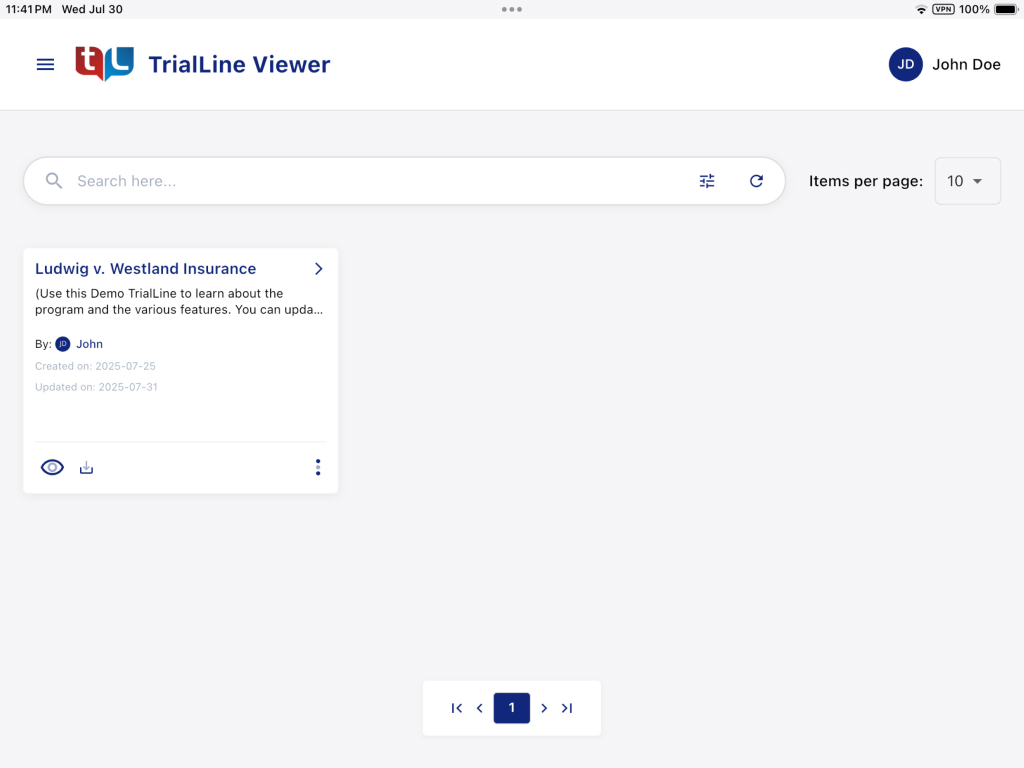
TrialLine lets users arrange and view a case timeline with precise event-by-event details. Legal professionals can input key information, including filing dates, court hearings, document submissions, and other significant occurrences. The software organizes these events in chronological order, reflecting the exact sequence of case events.

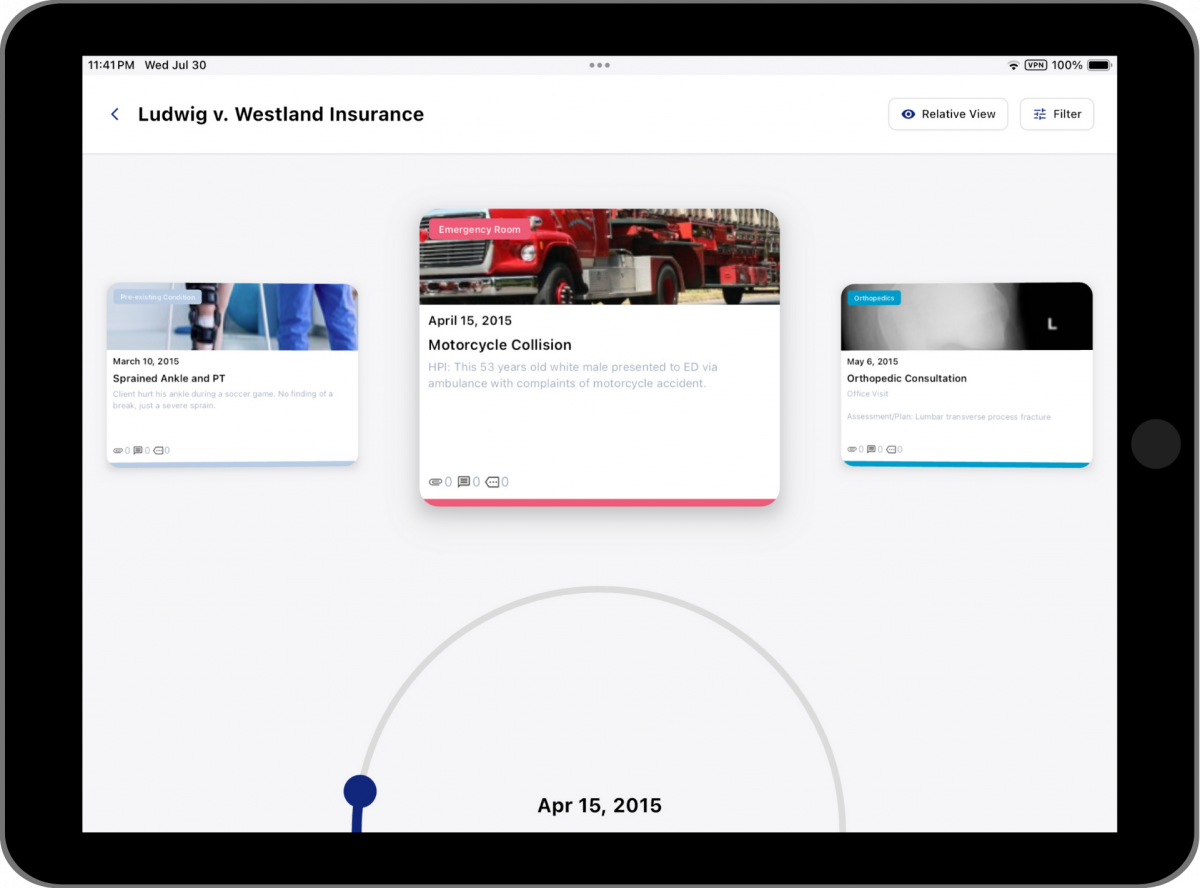
To suit different preferences, users can explore these timelines through three distinct layouts:

  • Relative: Focuses on the timing between events, helping users see how one event impacts another.
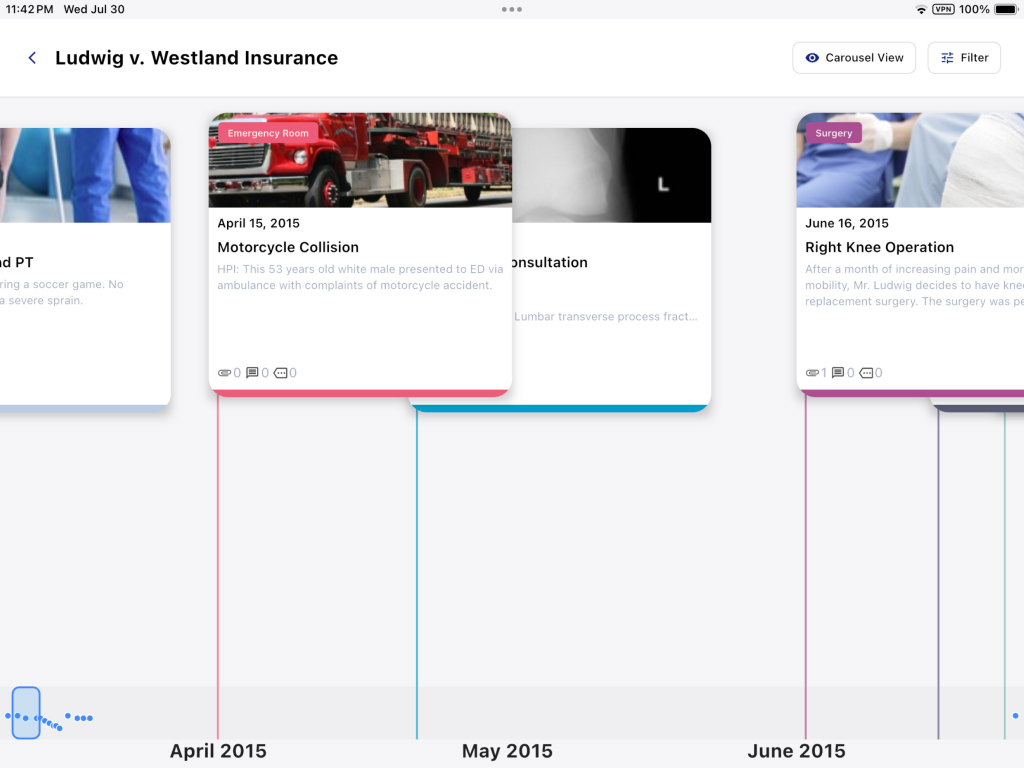
  • Carousel: Presents events in a scrollable format, making it easy to review large volumes of information.
  • Pyramid: Highlights the most important events at the top, emphasizing key milestones in the case.

These layout options provide flexibility in viewing case chronologies, supporting clear analysis and strong trial presentations.

Add Text Summaries and Supporting Documents

TrialLine improves the understanding of case events by allowing users to add text summaries. These summaries explain each event’s significance and provide essential context.

For deeper insight, users can attach relevant documents, images, and videos directly to each event. For example:

  • Licenses and certifications for key individuals involved in the case.
  • Court filings and motions linked to specific hearings.
  • Photographs or videos that serve as evidence during trial presentations.

This feature brings together all the building blocks needed for comprehensive case analysis and strong courtroom arguments.

Recommended Reading

Criminal Investigation Timeline

Edit and Share on Any Device

As cloud-based case timeline software, TrialLine offers full accessibility from desktops, laptops, tablets, and smartphones. Users can edit and share timelines from any device with internet access.

Key advantages include:

  • No software installation: Access the platform through a web browser.
  • Seamless device transitions: Move between devices without losing data.
  • Consistent user experience: Maintain functionality across all supported devices.

This flexibility supports case management processes, allowing legal teams to update and share case timelines without disruption.

Real-Time Collaboration

TrialLine supports real-time collaboration, enabling multiple users to work on the same timeline simultaneously. Updates from one user appear instantly on all devices.

This feature provides:

  • Efficient teamwork: Team members contribute regardless of their physical location.
  • Instant updates: All collaborators see changes as they happen, reducing delays.
  • Device flexibility: Access timelines from any internet-connected device.

These capabilities keep case management processes moving smoothly and keep case progress transparent for all team members.

Set Controls and Permissions

TrialLine allows users to set specific controls and permissions when sharing timelines. This ensures that each person sees only the information relevant to their role.

Key benefits include:

  • Customized views: Share specific sections of the timeline with staff, mediators, or opposing counsel.
  • Reduced risk of bias: Prevent unrelated details from influencing decisions.
  • Role-based access: Assign permissions based on each team member’s responsibilities.

These features support organized workflows and a clear division of responsibilities within the legal team.

Enable Contributor Comments

After setting appropriate permissions, TrialLine allows contributors to add comments directly to shared timelines.

The commenting feature provides:

  • Improved decision-making: Comments create a transparent record of discussions, helping in case reviews.
  • Collaboration history: Comments serve as a reference point for future audits or legal reviews.

This feature strengthens communication within the legal team, improving the overall understanding of case events.

Visually Appealing Timelines

TrialLine provides visually rich timelines that make trial presentations engaging and clear.

Key visual features include:

  • Color-coded categories: Distinguish between event types, making it easier to spot patterns.
  • Image thumbnails: Add images to events for quick visual context.
  • Event titles and icons: Clearly displayed titles with icons showing the number of attachments and comments.
  • Background images: Highlight key themes or topics related to the case.

These visual elements enhance the timeline’s clarity and impact, helping judges and juries follow the sequence of case events effortlessly.

Public Timeline Sharing

Unlike many litigation timeline software options, TrialLine allows the public sharing of case timelines.

Key aspects of this feature include:

  • Embed links: Generate links to display timelines on law firm websites.
  • Public access: Allow legal professionals and the public to review timelines for educational purposes.
  • Legal precedents: Share timelines that may contribute to understanding legal outcomes in similar cases.

Permissions control all public sharing, protecting sensitive information while enhancing accessibility.

Archive Case Timelines

TrialLine enables users to archive case timelines, preserving them for future reference.

This feature supports:

  • Organized workspace: Keep active timelines free from unnecessary clutter.
  • Regulatory compliance: Retain records for jurisdictions that require long-term storage.
  • Future case support: Access archived timelines when handling similar cases later.

Archiving timelines ensures an organized, efficient case management process while meeting professional requirements.

Export Timelines Into Excel Files

TrialLine offers an export feature for users who need to share or integrate timeline data with other tools.

Exporting timelines to Excel or CSV files helps you share files easily with others who don’t have a TrialLine account. You can also create personalized reports based on specific needs and analyze timeline data within Excel.

This export function adds flexibility, allowing law firms to integrate timeline data with other case management software or reporting tools.

Ready to Transform Your Case Management with TrialLine? Try TrialLine Today – Start Your Free Demo!

Simplify Your Case Timeline With TrialLine

trialline

TrialLine gives law firms an efficient way to manage case timelines and improve trial presentations. The software organizes key events, links relevant documents, and presents clear case chronologies. It also supports secure case management processes, making it a valuable tool for handling complex cases.

Digital file management comes with risks like accidental deletions and security threats. TrialLine reduces these risks with cloud-based access, real-time collaboration, and controlled sharing options. These features help legal professionals manage all the building blocks of a case securely and efficiently.

Sign up for a 14-day free trial and experience TrialLine’s powerful features.

FAQs About Timeline Software for Lawyers Features

How to make a timeline for a lawyer?

List all key events in chronological order, including filing dates, court hearings, and document submissions. Use TrialLine to organize events, add descriptions, and attach relevant documents for context.

What software is best for a timeline?

TrialLine is the best choice. It offers event organization, document linking, and real-time collaboration, and works across multiple devices.

What software do lawyers use?

Lawyers use TrialLine for case timelines and trial presentations, and tools like Clio and MyCase for broader case management processes.

What is the timeline of a legal case?

A legal case timeline outlines major events like client meetings, evidence gathering, filing deadlines, hearings, and trial dates in chronological order.

Why do lawyers need timeline software?

Timeline software helps lawyers organize case events, track deadlines, and present information clearly while linking all the building blocks of a case.